 Spectro
Fake lossless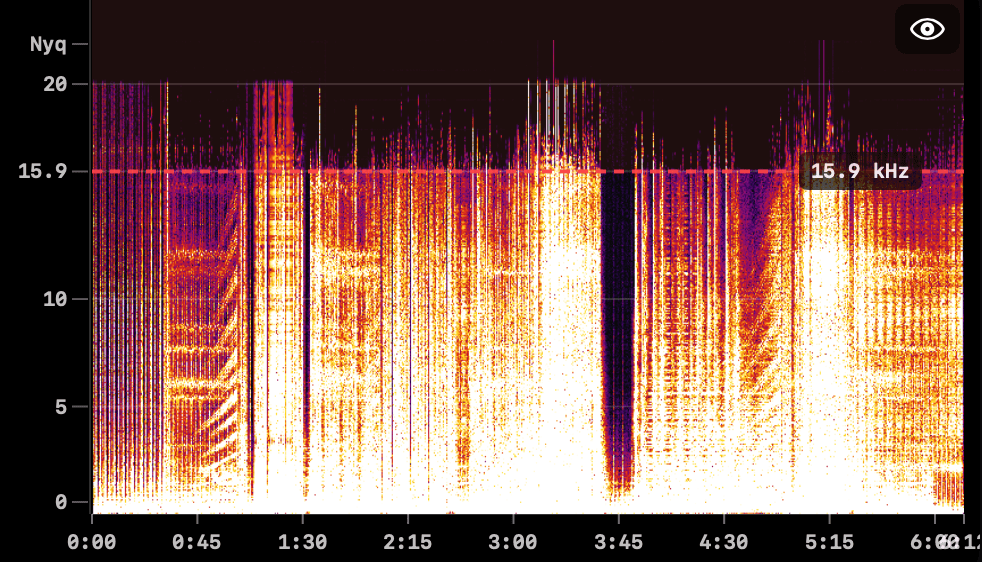
track-04-master.flac
~128 kbps MP3 in a FLAC wrapper. Brick wall at 15.9 kHz. Only hiss above the line. You paid for nothing.
Fake lossless detector for macOS
Scan WAV, AIFF, FLAC and ALAC files locally. Spectro checks the audio itself, not just the file extension, and gives every track a clear LOSSLESS, MEDIUM or FAKE verdict before you play it.
macOS 13+ · No account · Works offline · One-time purchase from $24.99
The problem.
Online stores, promo channels and Bandcamp uploads are full of MP3s upscaled and renamed to FLAC, WAV or AIFF. The file size goes up. The audio inside doesn't. Spectro reads the actual waveform with a full FFT, like a luthier tapping wood.
~128 kbps MP3 in a FLAC wrapper. Brick wall at 15.9 kHz. Only hiss above the line. You paid for nothing.
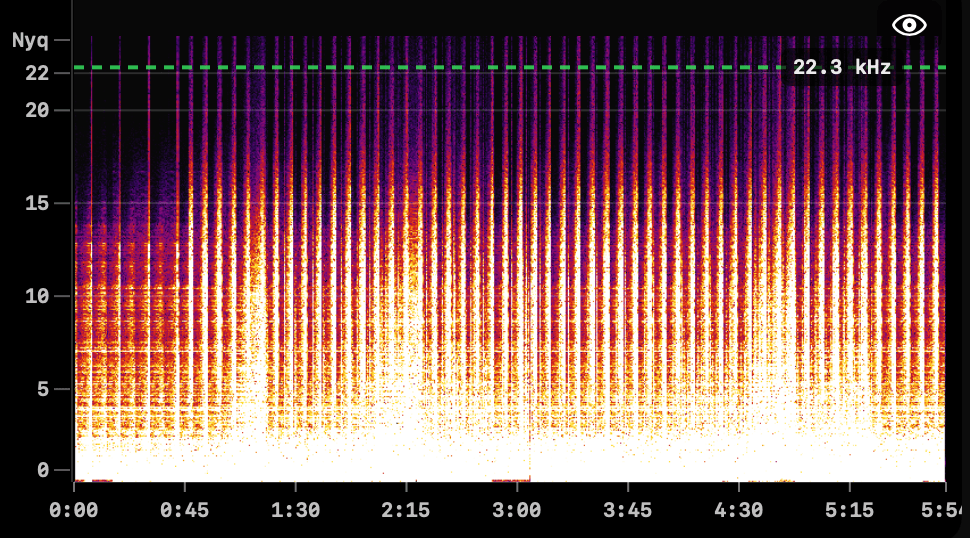
Energy reaches the Nyquist ceiling at 22.3 kHz. Air, transients and shimmer survive intact. This is what you bought.
What's included.
Spectro isn't a one-trick spectrogram viewer. It's a verdict engine, a batch scanner and a Finder-native quality control tool, tuned for libraries with tens of thousands of files.
Every track gets one answer: LOSSLESS, MEDIUM, or FAKE, with cutoff and a one-line diagnosis.
Scan an entire folder, get a verdict per track, and export spectrogram PNGs for multiple results in one batch.
Spectro writes color tags directly to your files. Open the folder later and problem files are already marked red.
Audio never leaves your Mac. No cloud upload, no library telemetry, and no account required. Sandboxed and notarized.
Personal for 1 Mac or Duo for 2. Same features on both plans, free updates, and no subscription or per-track fee.
Point Spectro at a folder and new tracks are analyzed automatically. Universal binary with Sparkle updates.
Works with your setup.
Import from Rekordbox XML or any M3U/M3U8 playlist, compatible with Traktor and VirtualDJ. Serato support coming soon.



 Soon
SoonHow it works.
Spectro doesn't need to know about your music management app. Drop files, get verdicts, decide what to do with them.
FLAC, WAV, AIFF, ALAC, MP3, AAC. A track, an album, or ~/Music. No import.
Spectral content, not the extension. Results stream in as they finish.
Filter FAKEs, move them to Trash, or open the spectrogram before you replace a track.
Why you can trust the verdict.
Spectro's spectral analysis is built on the methodology of D'Alessandro & Shi's peer-reviewed paper on MP3 bit-rate quality detection. The only known ambiguous case (256 kbps CBR vs. high-quality VBR) gets 92.4% accuracy, which Spectro flags explicitly as MEDIUM in the diagnosis panel.
Drop a folder, get verdicts. Spectro runs entirely on your machine: no internet required, no account to create, no files ever uploaded. Pull the network cable and it still works exactly the same.
From the community.
“I loaded all 653 tracks from my 'lossless' library into it. 10 fake, 57 medium, 586 lossless. And it analyzed them quite quickly.”
“I've just bought my own copy after a few tests. It looks reliable. My FLAC library is now getting huge. About 20TB.”
“Spectro just works the way I actually was hoping others would work. Very glad I found this post before pulling the trigger on Fakin' the Funk.”
Pricing.
All features included. Choose the number of Macs.
For 1 Mac
$24.99
once · USD
Buy Personal · $24.99Best value
For 2 Macs
$39
once · USD
Buy Duo · $39A fake lossless file is an MP3 or AAC that has been re-encoded and saved as WAV, AIFF or FLAC. The file size is larger but the audio quality is identical to the original compressed file - the high frequencies above the MP3 cutoff are permanently lost.
Yes. Spectro supports Rekordbox XML import directly: go to File → Import from Rekordbox and select your Rekordbox XML export file. Spectro loads your full collection automatically, with no drag and drop required. To export your XML from Rekordbox: File → Export Collection in xml format.
Yes. Spectro 1.3 added full ALAC support. Apple Lossless files (.m4a) are analyzed the same way as WAV and FLAC: spectral content determines the verdict, not the container.
Yes. Spectro processes files from any source: WAV, AIFF, FLAC, ALAC, MP3, and AAC.
No. Spectro runs entirely on your Mac. Nothing is uploaded, no account is needed, and no internet connection is required for analysis.
Spectro is free for your first 100 tracks. No time limit, no account required.
Yes. Use File → Export CSV to save your full batch results with verdict, format, bitrate, cutoff frequency, and confidence score for every track.
Yes. Spectro supports PNG export for individual spectrograms and bulk export for a batch of analyzed tracks.
You receive a license key by email. Enter it in the app to unlock unlimited scans. Personal lets you activate Spectro on 1 Mac for $24.99; Duo supports up to 2 Macs for $39. Same features on both plans.
Use cases.
Choose the guide that matches your setup. Each page is focused on one intent so you can move from search to trial quickly.
Free trial · 100 tracks · No card
Drop your most suspicious folder into Spectro and have your answer before the kettle boils.
macOS 13+ · Universal · No subscription · ever · 30-day refund