 Spectro
Spectro Team · June 4, 2026 · 6 min read
How to Detect Fake Hi-Res Audio: Method, Evidence, and Limits
How to detect fake hi-res: spectral method, upsample evidence, and limits. A 24-bit/96kHz FLAC can still be an upsampled CD. Store reliability is a separate article.
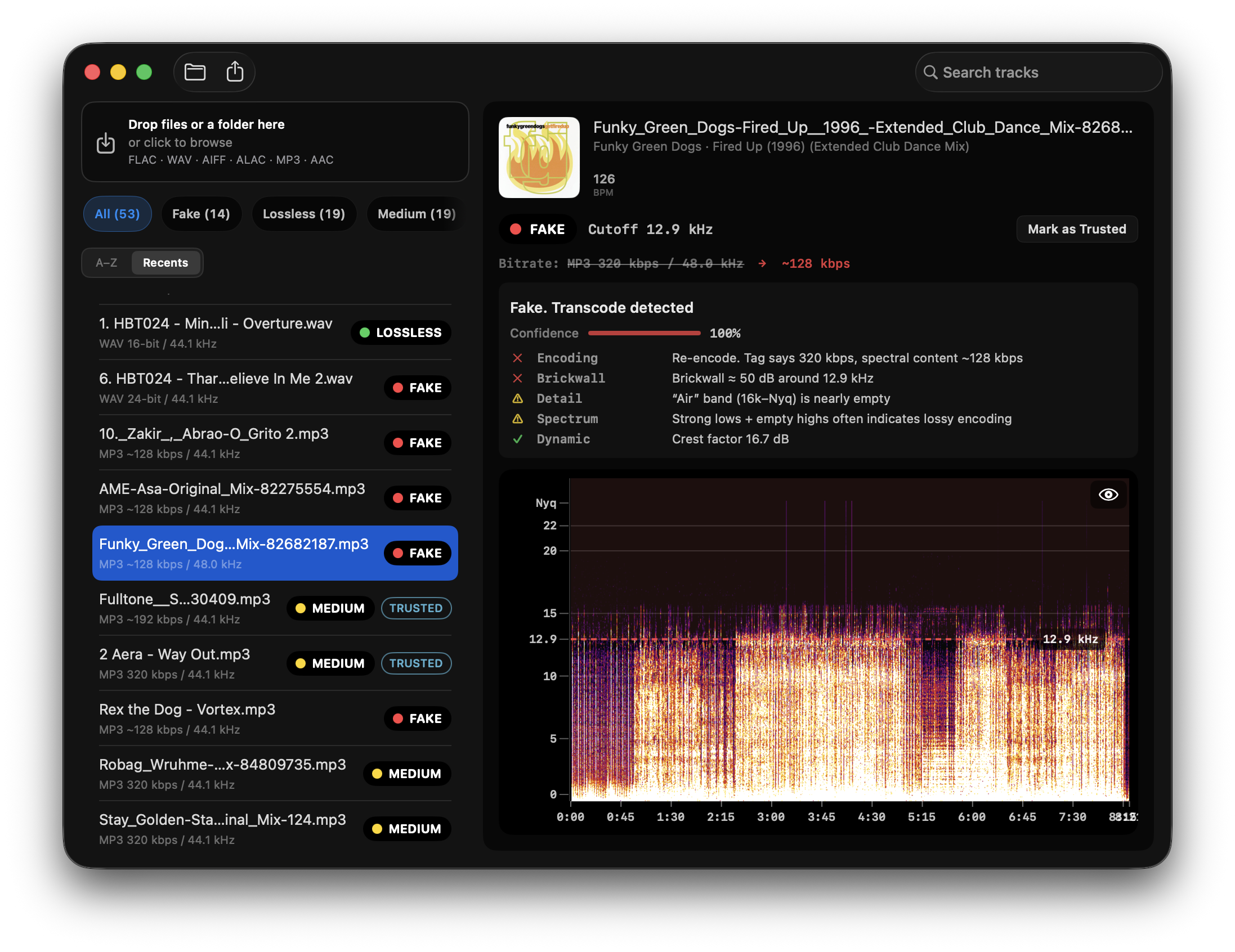
Quick Answer: This article is the detection method: how to spot CD audio padded into a 24-bit/48–96 kHz container, what evidence looks like, and where the method has limits. Spectro batch-scans hi-res FLAC folders on Mac and returns LOSSLESS/FAKE/MEDIUM (plus upsample gap detection at 22–22.5 kHz). For store provenance and buying decisions, see Is your hi-res download actually hi-res?. To run the check: fake FLAC detector.
What is fake hi-res audio?
Hi-res audio is typically defined as audio with sample rates above 44.1 kHz (96 kHz, 192 kHz) or bit depths above 16-bit. The problem: these specs describe the container, not the source. A 24-bit/96 kHz FLAC is just a box. What matters is what's inside it.
A fake hi-res file is one where the original recording, or some point in the production or distribution chain, existed at CD quality (16-bit/44.1 kHz), and was then mathematically converted to a higher sample rate to fill that box. No new audio information was added. The extra resolution is empty.
This isn't always deliberate fraud. Upsampling can happen at any point: a label delivers 44.1 kHz masters, a distributor's pipeline automatically converts to match a platform's hi-res tier, or an artist exports a 44.1 kHz session as 96 kHz without realizing the practical difference.
How does upsampling from CD quality to 24-bit happen?
Upsampling is the process of increasing a file's sample rate using software interpolation. A DAW export or a store pipeline can turn a 44.1 kHz file into a 96 kHz file in seconds. The result passes any surface-level spec check: the file is technically 24-bit/96 kHz. But the audio data above 22 kHz, the region that only genuine 96 kHz recordings contain, is either absent or filled with interpolated noise that carries no musical information.
The most common pattern in DJ libraries is a narrower version of this: tracks acquired at 44.1 kHz that were later upsampled to 48 kHz, either by a DAW session export, a distributor's pipeline, or a DJ software conversion. The frequency content ends at 22 kHz (the 44.1 kHz Nyquist), leaving a characteristic dead zone between 22 and 24 kHz that genuine 48 kHz recordings don't have.
What does genuine hi-res look like vs. upsampled?
The difference is visible in the frequency spectrum. Genuine 96 kHz audio contains energy extending toward the 48 kHz Nyquist ceiling, not necessarily loud, but present: natural harmonics, room ambience, instrument overtones. The energy tapers organically as it approaches the ceiling.
An upsampled file has a hard cutoff at approximately 22 kHz, the original source's Nyquist. Above that: nothing, or a faint noise floor without musical structure. The spectrogram looks like a genuine hi-res file with the top half cut off cleanly.
A specific and detectable signature: files upsampled from 44.1 kHz to 48 kHz often show a gap at exactly 22–22.5 kHz. The audio ends at the 44.1 kHz Nyquist but hasn't reached the 48 kHz ceiling, creating a dead band that doesn't appear in genuine 48 kHz recordings.
Why do Qobuz or Tidal 24/96 files still die at 22 kHz?
Because many “hi-res” WEB FLACs are CD masters in a 96 kHz box. The store can be honest about the container. The label may still have delivered 44.1 kHz PCM. Spectro will show a cutoff stuck near 21–22 kHz on a file tagged 24-bit/96 kHz. That is upsample / catalog padding, not an MP3 brickwall at 16 kHz.
This is the pattern audiophile forums report on Qobuz, Tidal, and aggregator WEB FLACs: tagged 96 kHz, energy stops at CD Nyquist. It is not a how-to for grabbing streams. Spectro cannot inspect DRM. Download or rip a file you own, then scan it.
For 44.1→48 kHz DJ conversions, look for the 22–22.5 kHz dead band. Verdict Engine v1.5 still flags that gap (the v1.4 upsample detector, kept and extended). For buying context by store, use Is Your Hi-Res Download Actually Hi-Res?. For whether a CD rip log proves the master, see A 100 Log Does Not Prove Your FLAC Is Lossless.
How does Spectro detect upsampled audio?
Spectro includes a dedicated upsampling gap check. For files with a declared 48 kHz sample rate, Verdict Engine v1.5 analyzes energy distribution in the 19–22.5 kHz band. If the energy in the sub-gap region (19–22 kHz) drops more than 25 dB relative to the gap region (22–22.5 kHz), Spectro returns a MEDIUM verdict, the audio is likely upsampled from a 44.1 kHz source.
For broader hi-res files (24-bit/96 kHz with a cutoff near 22 kHz), the standard spectral cutoff analysis applies: the estimated cutoff in the diagnosis panel will reflect the actual source quality, not the declared sample rate. A 96 kHz file where the cutoff reads 21.8 kHz has CD-quality audio in a hi-res container.
Both detection paths run automatically on every file. No configuration required.
Which sources are most likely to have upsampled hi-res files?
The risk is highest in three scenarios: DJ pools and record pools where audio passes through automated encoding pipelines; self-distributed content on platforms like Bandcamp where the artist controls the export settings and may not know the difference; and older catalog reissues where the original master predates the hi-res era and was digitized at 44.1 kHz before being re-released as hi-res.
Dedicated audiophile stores with direct label relationships and independent quality verification tend to have lower rates. But no store is immune, the problem is upstream, in the recording and mastering chain, not in the store's platform.
Does upsampled hi-res audio actually sound different?
In controlled listening tests, the perceptible difference between genuine 24/96 and upsampled CD quality is negligible on most playback systems. The practical arguments are about integrity and storage: you paid a premium price for a format that delivers no additional audio data, and the file is roughly twice the size of the genuine lossless equivalent. In a library of 50,000 tracks, that overhead adds up.
The more concrete concern is for producers and mastering engineers who use hi-res files as source material for further processing. An upsampled 96 kHz file reintroduces quantization noise during any downsampling step in ways that a genuine hi-res source doesn't.
How do you check your hi-res library for upsampled files?
Batch scan an entire DJ folder on Mac offline: drop your hi-res files into Spectro and read the automatic LOSSLESS/FAKE/MEDIUM verdict first. Files where the spectral cutoff sits significantly below the declared sample rate will receive a MEDIUM verdict. Open Spek or Spectro's spectrogram only as secondary confirmation: genuine hi-res shows energy above 22 kHz; upsampled files have a clean cutoff at the original source Nyquist.
For a deeper explanation of how spectral analysis detects fake audio, see The Science Behind Fake Lossless Audio Detection. For FLAC authenticity at CD resolution, see How to Verify Your FLAC Files Are Actually Lossless. Store-by-store buying context lives in Is Your Hi-Res Download Actually Hi-Res?.
Related posts
Try Spectro free
100 tracks free. No account needed. Personal $24.99 for 1 Mac; Duo $39 for up to 2 Macs.
Download the free 100-track trial