 Spectro
Spectro Team · May 5, 2026 · 7 min read
How to Verify Your FLAC Files Are Actually Lossless
How to check if a FLAC file is real: verify FLAC authenticity from Qobuz, HDtracks, or Bandcamp by reading the frequency spectrum. Not the file extension.
Quick Answer: To verify FLAC authenticity, look at the audio inside the container. Not the
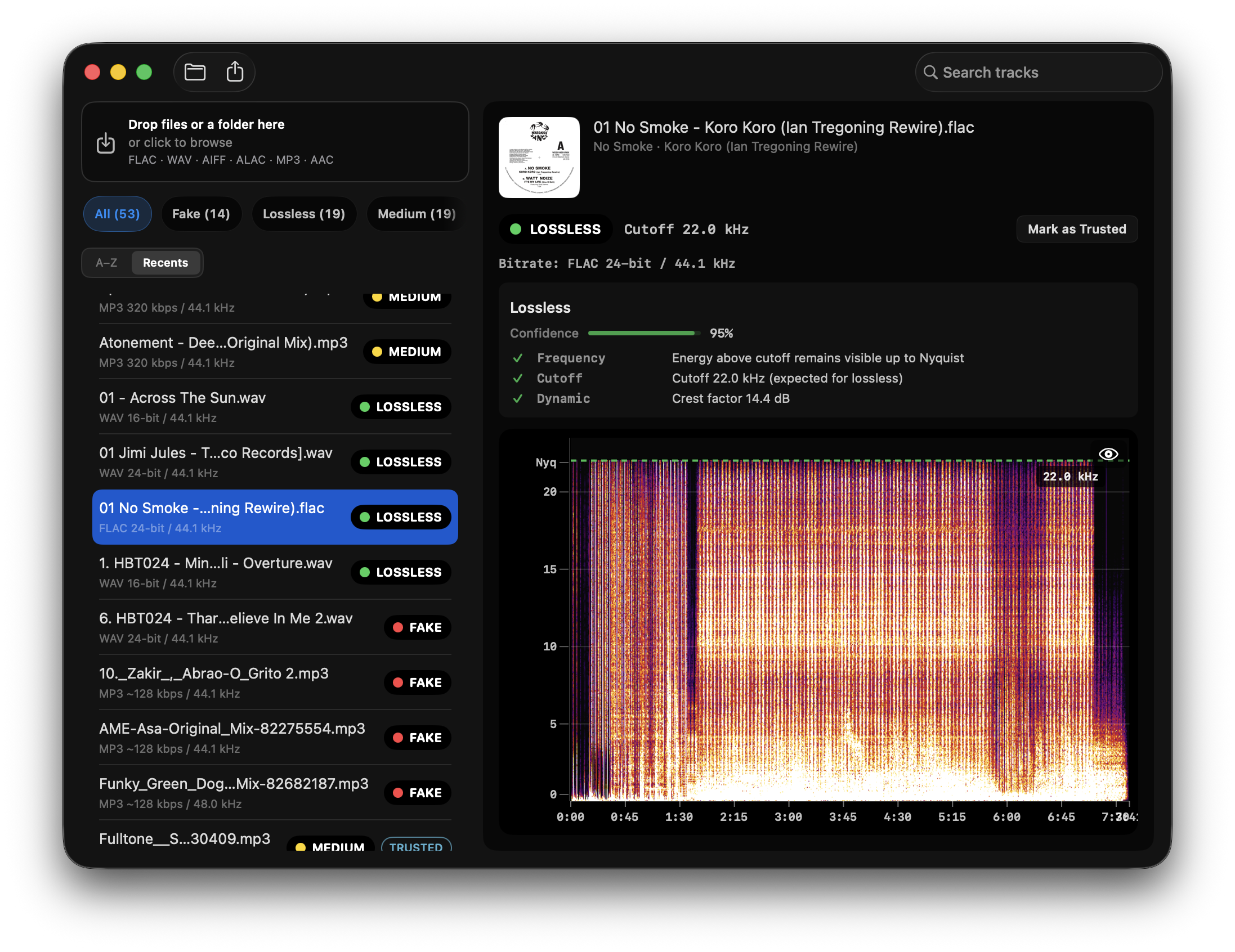
.flacextension. A real lossless FLAC has energy toward Nyquist; a fake FLAC (MP3 or AAC re-wrapped as FLAC) shows a hard cutoff, typically 16–20 kHz. Spectro’s fake FLAC detector batch-scans FLAC folders on Mac and returns LOSSLESS, FAKE, or MEDIUM per file. For a multi-format Mac workflow, use the how-to detect fake lossless guide instead.
Why FLAC doesn't guarantee lossless audio
FLAC stands for Free Lossless Audio Codec, and it is, technically, a lossless format. Whatever audio data goes in comes out bit-for-bit identical. The problem is what goes in.
A FLAC file is a container. It doesn't care about the provenance of the audio inside it. If someone takes an MP3, decodes it, and re-encodes the resulting PCM into FLAC, the result is a valid FLAC file, but the audio it contains is lossy. The damage done by the original MP3 encoder cannot be undone. You've just added a lossless wrapper around degraded audio.
This is called a fake FLAC, and it's more common than most audiophiles expect, including on paid download stores. For whether genuine FLAC beats an honest MP3, see Is FLAC Better Than MP3?. A 100 AccurateRip log still does not prove the master: A 100 Log Does Not Prove Your FLAC Is Lossless.
Where fake FLAC comes from
The problem exists across every tier of the music industry supply chain:
Label delivery errors. Some labels deliver masters in lossy formats to aggregators, who package them as FLAC without verifying the source. The store lists them as lossless. Neither party notices until someone checks.
Catalog upsampling. Older catalog tracks may have been digitized from analog sources decades ago, often as 128 or 192 kbps MP3, and later repackaged into FLAC as digital storefronts upgraded their format offerings. The FLAC is real. The lossless claim is not.
Hi-res upsampling. The fake lossless problem extends beyond 16-bit/44.1 kHz. A 24-bit/96 kHz FLAC file can be an upsampled MP3. The sample rate is higher, but the frequency content stops at the same lossy cutoff. Buying "hi-res" doesn't protect you from this.
Bandcamp and direct downloads. Artists and labels upload what they have. If the master was an MP3, the FLAC on Bandcamp is fake. Bandcamp does not verify source format before accepting uploads.
What genuine lossless looks like vs. fake
The most reliable check for a FLAC purchase folder is spectral authenticity: does the decoded audio look like a lossless source, or like a lossy encode sitting in a FLAC wrapper? That is a different question from “how do I scan a mixed DJ crate on Mac,” which belongs in How to Detect Fake Lossless Audio Files on Mac.
Genuine lossless: Energy extends continuously up toward Nyquist. For a 44.1 kHz file, that means content reaching close to 22 kHz. The rolloff is gradual and follows the natural characteristics of the recording or mastering.
Fake FLAC from MP3: A hard, flat cutoff appears between 16 kHz and 20 kHz, typically at exactly 16 kHz (128 kbps), 18.5 kHz (192 kbps), or 20 kHz (320 kbps). The cutoff is the frequency limit at which the original MP3 encoder discarded audio data. Re-encoding to FLAC adds no information, the cutoff remains exactly where the MP3 left it.
Fake FLAC from AAC: AAC cutoffs are less geometrically clean than MP3 cutoffs. The frequency content typically fades out between 14–19 kHz rather than dropping as a vertical wall. Some AAC-derived FLACs are harder to diagnose by eye alone.
The 256 kbps ambiguous zone. High-bitrate CBR MP3 (256–320 kbps) and high-quality VBR can approach 22 kHz. Spectro's research baseline (ACM MM&Sec 2009) reports 92.4% accuracy at this bitrate, the one genuinely ambiguous case. Spectro flags these as MEDIUM rather than issuing a false LOSSLESS verdict.
How to check if a FLAC file is real
Look at the spectrum of the audio inside the FLAC, not the file extension. Opening files one by one in Spek still works as a visual check, but it requires knowing what a fake cutoff looks like. For a purchase folder of FLACs, use a fake FLAC detector: Spectro reads the FFT of each FLAC and returns LOSSLESS, FAKE, or MEDIUM.
- LOSSLESS, frequency content reaches toward Nyquist with no anomalous cutoff
- FAKE, hard cutoff detected consistent with lossy source encoding
- MEDIUM, ambiguous result (high-bitrate CBR MP3, unusual mastering, or format edge case)
The detection is fully offline. Files never leave your Mac. For mixed WAV/AIFF/FLAC crates, switch to the Mac multi-format how-to.
Which stores have the best FLAC reliability?
Based on publicly documented cases and community reporting:
| Store | Known issues | Notes |
|---|---|---|
| Qobuz | Rare; generally reliable | Strongest QC among paid stores |
| HDtracks | Historical issues with catalog titles | Improved, but older purchases worth checking |
| Bandcamp | Varies by artist/label | Upload is unverified, quality depends on what the artist had |
| Beatport | Documented cases of fake lossless | DJ-focused catalog, historically inconsistent |
| Tidal (downloads) | Community reports of upsampled material | Streaming quality vs. download quality differ |
| iTunes/Apple Music lossless | Generally reliable for Apple Lossless (ALAC) | ALAC is a different codec but same lossless container principle applies |
No store has zero cases. The safest practice is to verify files you've purchased, especially catalog titles and anything labeled "hi-res."
Does lossy audio inside FLAC actually matter for listening?
This depends on your use case, but the audiophile argument is straightforward: if you bought lossless, you should get lossless. Beyond the contract argument, lossy compression artifacts, pre-ringing, intermodulation distortion, smearing in the 8–12 kHz range, are real, even if their audibility on any given track depends on the content, your system, and your hearing.
The frequency cutoff visible in the spectrogram is a detection marker, not the only artifact. Lossy compression affects the entire reconstructed signal, not just the high-frequency band it discarded. A fake FLAC at 320 kbps is a better file than one at 128 kbps, but it is not lossless, and calling it lossless is inaccurate regardless of whether you can hear the difference on a specific track.
How to check your FLAC library
- Download Spectro and open it on your Mac.
- Drag a folder of FLAC files (or your entire music library folder) into the Spectro window.
- Spectro analyzes the frequency spectrum of each file and returns a LOSSLESS, FAKE, or MEDIUM verdict automatically.
- Filter by FAKE to see which files contain lossy audio despite their FLAC extension.
- For MEDIUM results, open the file in Spek for a manual second look at the spectrogram.
The trial covers 100 tracks. Paid plans start at $24.99: Personal for 1 Mac or Duo for up to 2 Macs at $39.
Frequently asked questions
Can a 24-bit/96 kHz FLAC still be fake lossless? Yes. Sample rate and bit depth don't determine whether the source audio was lossless, only the frequency content does. A 24/96 FLAC derived from a 192 kbps MP3 still shows the 18.5 kHz MP3 cutoff in the spectrum.
Is there a way to fix a fake FLAC? No. Lossy encoding is destructive and irreversible. Converting a fake FLAC back to MP3 or keeping it as FLAC makes no difference, the lost audio data is permanently gone. The only fix is obtaining a lossless master from the source.
Does Spectro work on ALAC, WAV, and AIFF files as well? Yes. Spectro analyzes WAV, AIFF, FLAC, and MP3. This article is about verifying FLAC authenticity. For a Mac workflow across formats, see How to Detect Fake Lossless Audio Files on Mac.
How is Spectro different from opening files in Spek? Spek shows a spectrogram that you interpret visually, one file at a time. Spectro returns an automatic verdict per FLAC across a folder. Spek remains useful for a single MEDIUM file you want to inspect by eye.
Related posts
Try Spectro free
100 tracks free. No account needed. Personal $24.99 for 1 Mac; Duo $39 for up to 2 Macs.
Download the free 100-track trial