 Spectro
Spectro Team · April 21, 2026 · 6 min read
Is Beatport Actually Lossless? How to Check
Beatport sells WAV and AIFF files labeled as lossless. But are they always genuine? Here's how music distribution can introduce transcoding without anyone noticing, and how to verify any download in seconds.
Quick Answer: Most Beatport WAV and AIFF downloads are genuinely lossless, but not all. Transcoding can happen anywhere in the label-to-distributor-to-store pipeline without anyone noticing. The only way to verify a file is to check its frequency spectrum directly. Not trust the file extension or purchase receipt.
Beatport is the most widely used platform for buying music in the DJ world. Its WAV and AIFF downloads are sold as lossless. And most of the time, they are. But the question of whether every file you've purchased is actually lossless is not as simple as trusting the label.
This article explains how music distribution works, where transcoding can happen without anyone intending it, and most importantly, how to verify any file in your library regardless of where it came from.
How is lossless audio distributed from label to store?
When a record label releases a track, the mastering engineer delivers a 24-bit WAV or AIFF file to the distributor. The distributor ingests it, stores it, and serves it to stores like Beatport, Traxsource, or Bandcamp. When you buy and download the file, you receive the WAV or AIFF that came from the label.
In theory, this chain is clean. In practice, it has several points where things can go wrong.
Where can transcoding happen in the distribution chain?
At the distributor. Music distributors use automated ingest pipelines that process, normalize, and sometimes transcode audio. Some distributors use MP3 internally for streaming previews and, in poorly configured systems, the wrong version of the file can end up in the delivery queue.
At the store. Stores that serve multiple formats (MP3, FLAC, WAV) generate these files from a single master. If the master ingested by the store was already degraded, all derived formats will be degraded. Stores don't typically re-verify file integrity against the original master.
At the label or artist level. Independent labels and artists upload their own files directly to distributors. If the original upload was already an MP3 mislabeled as WAV (which happens more often than the industry acknowledges) the downstream delivery is fake lossless from the start.
In your own workflow. Sometimes the issue isn't the store. A track downloaded months ago, converted by a friend, or processed through a workflow that re-encodes audio is fake lossless by the time it reaches your library. Knowing a file came from Beatport doesn't tell you what has happened to it since.
What has the DJ community found about Beatport audio quality?
DJs who have systematically checked their libraries report that the vast majority of files from major stores. Beatport, Traxsource, Bandcamp, direct label shops. Are genuine lossless. The problem is not universal, but it exists.
Some genres and distribution channels have worse rates than others. Releases from small independent labels that upload to multiple platforms simultaneously tend to have more transcoding issues than major label releases. Older catalog music that has been re-uploaded multiple times can accumulate encoding errors across releases.
Bandcamp, which allows artists to upload any format and often sells FLAC, has documented cases of artists uploading lossy masters. Not maliciously, but because the artist didn't understand the difference. The buyer sees "FLAC download" and assumes lossless.
Beatport's direct WAV downloads from well-distributed labels tend to be reliable. But "tends to be reliable" is not the same as "always genuine," and for DJs playing on high-end systems where audio quality is audible, that distinction matters.
How do you verify a file from any store?
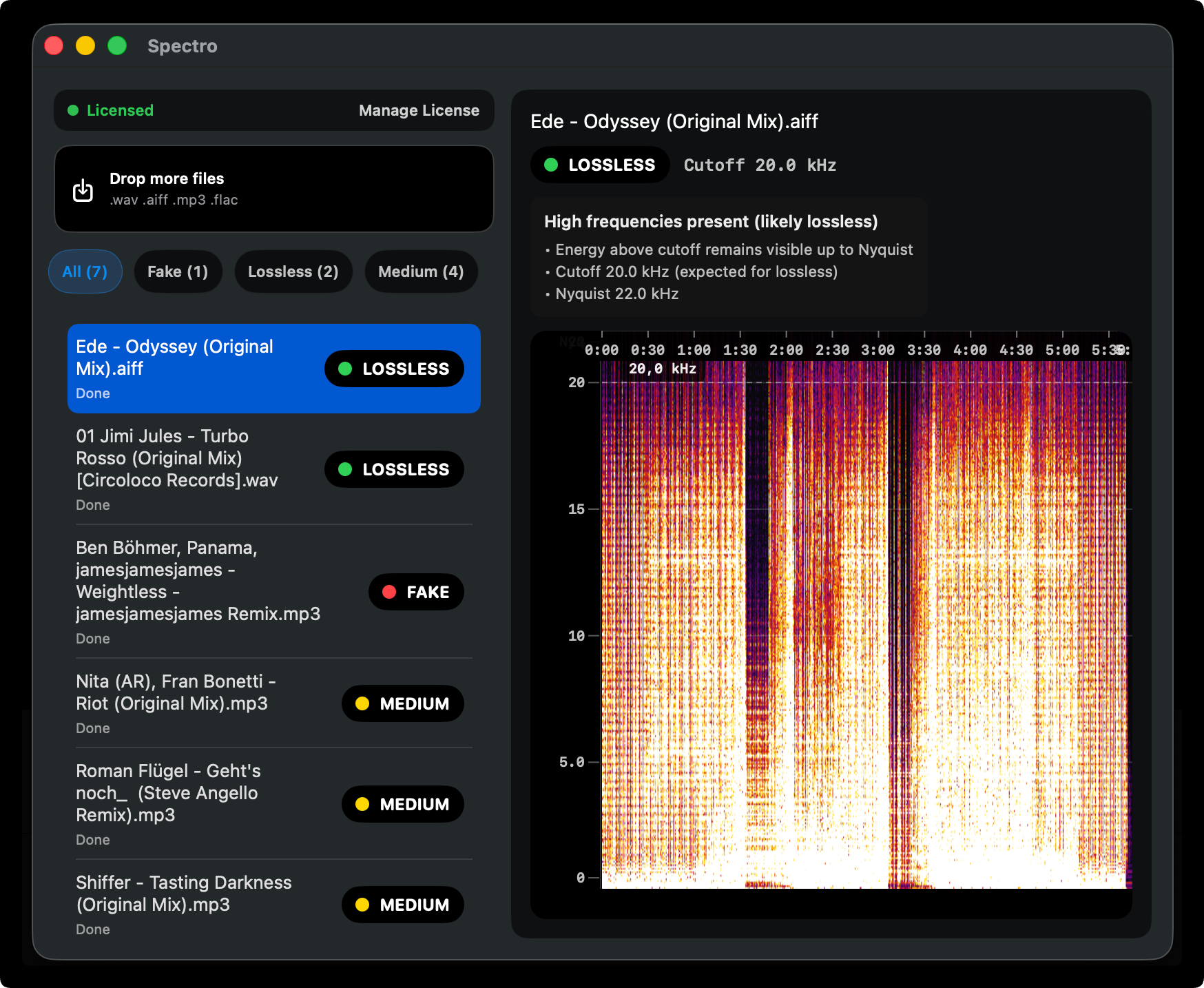
The definitive check is a spectrogram analysis. A genuine lossless file shows frequency content extending naturally toward 22 kHz (the Nyquist limit for 44.1kHz audio). A transcoded file. Regardless of its container format. Will show a hard cutoff at the frequency where the original lossy encoding removed the data.
You can read a spectrogram manually, but for a library of hundreds of downloads it's not practical. See our guide on how to detect fake lossless audio files for a detailed breakdown of what to look for.
For batch verification, Spectro processes entire folders and returns a verdict. LOSSLESS, FAKE, or MEDIUM. For each file. Drag in your Beatport downloads folder, and you'll have a complete picture of what you actually have in under two minutes.
What does a MEDIUM verdict mean for store downloads?
Spectro's MEDIUM verdict means the file has high-frequency content that doesn't extend cleanly to the Nyquist limit, but isn't clearly a hard cutoff either. For store downloads, a MEDIUM result often indicates one of a few things:
- The source recording has natural high-frequency rolloff (common in older recordings, vinyl transfers, or heavily mastered electronic music)
- The file was sourced from a high-bitrate MP3 (320kbps) rather than a true lossless master
- The store's delivery pipeline applied mild processing that affected the upper frequency range
A MEDIUM file from Beatport is almost always listenable without any audible quality issue. 320kbps MP3-equivalent quality is high. But it's not what you paid for if the listing said WAV.
What should you do if you find a fake Beatport file?
Contact the store. If a file purchased as lossless is clearly transcoded, the store may provide a replacement. Beatport's support responds to specific quality complaints. Document the issue with a spectrogram screenshot.
Check if a lossless version exists elsewhere. The track may be available at genuine lossless quality from a different store, direct from the label, or on Bandcamp. A quick search before purchasing can reveal which platforms have the correct master.
Decide whether it matters for your use case. A high-bitrate transcode in a warm-up set on a mid-range system is not the same problem as the same file in the peak hour of a main stage set. Knowing what you have lets you make that call consciously.
How do you build audio verification into your purchase workflow?
The most effective approach is checking files when you buy them rather than auditing the library after the fact. A practical routine:
- Download new music into a staging folder, separate from your main library.
- Run Spectro on the staging folder before adding files to the main library.
- Flag anything FAKE or unexpectedly MEDIUM and decide whether to replace it.
- Move verified files into the main library.
This adds approximately 30 seconds per batch of new purchases. Over time, it keeps your library clean without requiring periodic full audits.
If you want to run a complete audit of your existing library first, our guide on pre-gig audio quality checks covers the workflow for both one-time audits and ongoing maintenance.
Beatport is among the more reliable lossless stores for DJ music. Most of what you've bought there is probably genuine. But "probably" is not a quality guarantee, and the distribution chain has enough points of failure that verification is worthwhile. Especially for music you play on systems where audio quality is audible.
The check takes seconds. The downside of not checking is playing a fake WAV through a club system you can't control.
Related posts
Try Spectro free
100 tracks free. No account needed. Personal $24.99 for 1 Mac; Duo $39 for up to 2 Macs.
Download the free 100-track trial