 Spectro
Spectro Team · April 30, 2026 · 4 min read
Does Fake Lossless Audio Affect Mixed In Key Analysis?
Fake lossless files can skew harmonic key detection in Mixed In Key. Here's how lossy encoding artifacts affect key analysis. And what to do about it.
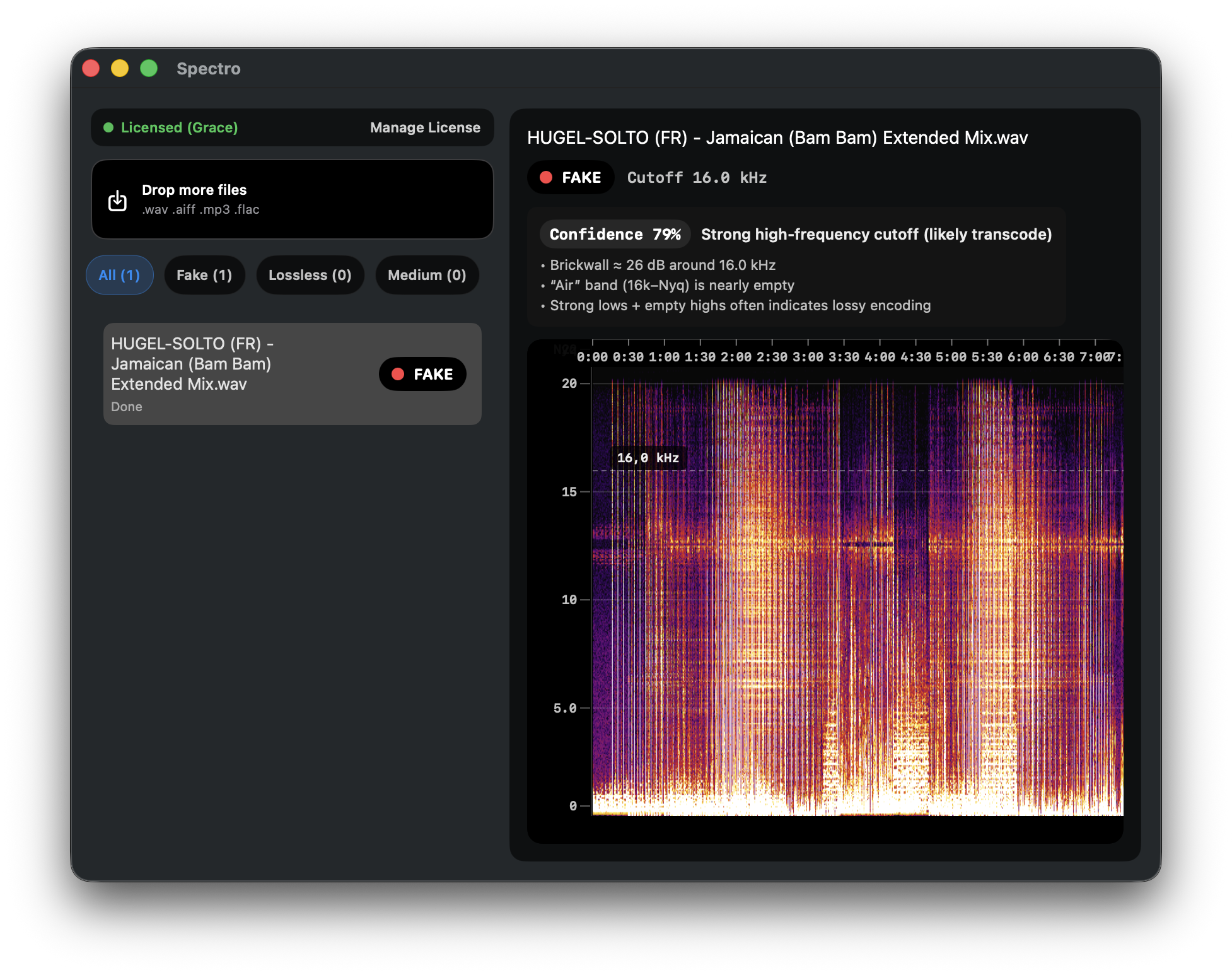
Quick Answer: Fake lossless files can cause incorrect key readings in Mixed In Key, particularly files transcoded from low-bitrate sources (128–192 kbps). Lossy encoding introduces harmonic artifacts and distorts the spectral energy that key detection algorithms rely on. High-bitrate fake lossless files (sourced from 256–320 kbps) rarely cause key errors, but the spectral cutoff is still present and audible on high-end systems.
Mixed In Key is the industry standard for harmonic mixing preparation. DJs use it to build playlists where tracks flow smoothly between compatible keys. A workflow that depends entirely on accurate key readings. What most DJs don't consider is how the quality of the source file affects that accuracy.
How does Mixed In Key detect key?
Mixed In Key analyzes the harmonic content of an audio file. The distribution of energy across pitch classes. And identifies the most likely musical key using the Camelot Wheel system. The algorithm is sophisticated, but it depends on a clean and complete representation of the audio's harmonic structure.
Genuine lossless files provide exactly that. The full frequency spectrum is intact, and the harmonic relationships between instruments are preserved as they were in the original recording.
How do lossy encoding artifacts affect key detection?
Lossy compression (MP3, AAC) does not remove audio uniformly. It removes frequency information according to a psychoacoustic model that predicts what the human ear is least likely to notice. In practice, this means:
High-frequency content is cut. The hard cutoff above 16–20 kHz removes overtones and harmonics in the upper register. For instruments with significant harmonic content in this range (cymbals, high-pitched synths, certain vocals) the truncated harmonics can create ambiguous pitch class representations.
Pre-ringing and smearing occur. MP3 encoding introduces time-domain artifacts near transients. Subtle pre-ringing before sharp attacks. These artifacts add spurious spectral energy that was not in the original signal. Key detection algorithms reading this energy may weight certain pitch classes incorrectly.
Intermodulation distortion adds phantom harmonics. At lower bitrates, intermodulation between frequency components creates harmonic artifacts that do not correspond to any real musical pitch in the track. These phantom harmonics are low-level but measurable, and they can shift a key reading by a semitone in borderline cases.
When does this actually cause a wrong key reading?
In practice, key errors from fake lossless files are rare with high-bitrate sources and more likely with low-bitrate sources. The risk profile:
128 kbps source → fake WAV: Meaningful risk. The missing harmonics and encoding artifacts are substantial. Tracks with complex harmonic content (jazz chords, layered synths, dense mixes) are most vulnerable. A semitone error in Camelot notation is plausible.
192 kbps source → fake WAV: Lower risk. The spectral cutoff is higher (around 19 kHz) and artifacts are smaller. Errors are possible in complex harmonic material but less common.
256–320 kbps source → fake WAV: Rare. The spectral differences between a high-bitrate MP3 and genuine lossless are small enough that key detection is rarely affected. The audio quality problem is still present, but key accuracy is not the main concern.
Does fixing the file fix the key reading?
Yes. If you replace a fake lossless file with a genuine lossless version of the same track and re-analyze it in Mixed In Key, the key reading will be based on complete spectral data. For tracks where the fake version produced a questionable or incorrect reading, the genuine version typically resolves the discrepancy.
This is worth checking if you have tracks in your library flagged as FAKE by Spectro and you notice key conflicts when mixing them harmonically.
What is the practical workflow?
Step 1: Scan your library with Spectro. Note which files are FAKE and which are at low bitrate sources.
Step 2: For FAKE files, replace with genuine lossless downloads before running Mixed In Key analysis.
Step 3: If you have already analyzed your library and suspect some key readings are wrong, re-analyze after replacing fake files.
Running Mixed In Key on verified lossless files gives you key readings you can trust. Running it on unverified files means some of those Camelot assignments are probabilistic at best.
For the full technical picture of how lossy encoding affects audio analysis tools including stem separation, see Does Fake Lossless Audio Affect Stem Separation and Key Detection?. For how to detect fake lossless files in your library, see How to Detect Fake Lossless Audio Files on Mac.
Related posts
Try Spectro free
100 tracks free. No account needed. Personal $24.99 for 1 Mac; Duo $39 for up to 2 Macs.
Download the free 100-track trial