 Spectro
Spectro Team · April 30, 2026 · 5 min read
Why Your 320kbps MP3 Sounds Like 128kbps
A 320 kbps MP3 transcoded from a 128 kbps source sounds like 128 kbps. Regardless of the bitrate on the label. Here's the science behind why, and how to detect it.
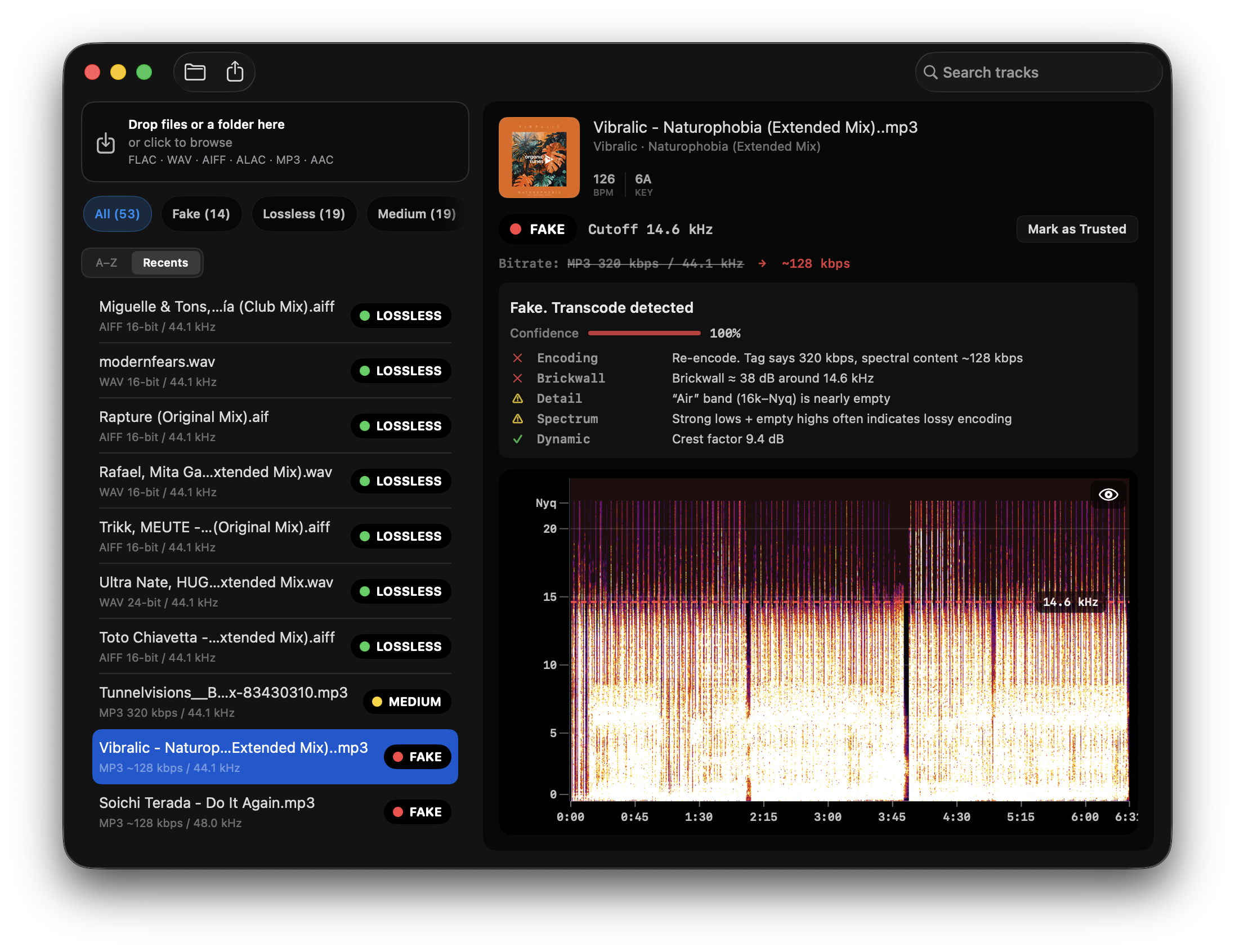
Quick Answer: A 320 kbps MP3 transcoded from a 128 kbps source retains the frequency spectrum of the original. Not the new bitrate. The 320 kbps label describes the container, not the content. Peer-reviewed research (ACM MM&Sec 2009) confirms this is detectable with 99% accuracy across thousands of tracks using spectral frequency analysis.
If you've ever downloaded a "320 kbps WAV" or accepted a high-bitrate file from a promo pack, you might be carrying files that sound like 128 kbps regardless of what the metadata says. The bitrate printed on a file tells you how it was encoded last. Not where the audio came from.
Why does transcoding preserve the original quality floor?
When audio is encoded as MP3, the encoder applies a psychoacoustic model that permanently discards frequency information deemed inaudible. Typically everything above a cutoff threshold that depends on bitrate. A 128 kbps MP3 cuts off around 16 kHz. A 192 kbps MP3 cuts at around 19 kHz. A genuine 320 kbps MP3 extends to 20–20.5 kHz.
The critical point: once that information is discarded, it cannot be recovered. Re-encoding a 128 kbps MP3 at 320 kbps creates a larger file with a higher bitrate label. But the audio spectrum stops at 16 kHz, exactly where the original encoder left it. The extra bitrate is wasted encoding silence above the cutoff.
This is not a flaw in any specific encoder. It is a fundamental property of lossy audio compression. The damage is permanent and format-independent.
What does the research actually say?
D'Alessandro and Shi (ACM Multimedia and Security, 2009) studied transcoding detection across 2,512 songs spanning multiple genres. Their findings:
- Spectral frequency analysis correctly identified transcoded audio with 97–99% accuracy across standard bitrate combinations.
- The detection method works by comparing the observed high-frequency cutoff against the expected cutoff for the declared bitrate.
- The only genuinely ambiguous case is 256 kbps CBR vs. high-quality VBR (e.g., VBR-0), where the spectral profiles overlap. Roughly 92% accuracy in that specific case.
- Genre, instrumentation, and tempo had no meaningful effect on detection accuracy.
This research underpins Spectro's detection method. The verdicts are not heuristic guesses. They are backed by peer-reviewed work on thousands of real tracks.
How do you spot a transcoded 320 kbps file visually?
In a spectrogram, a genuine 320 kbps MP3 shows audio energy extending to approximately 20–20.5 kHz with a gradual roll-off. A transcoded 320 kbps file. Originally encoded at 128 kbps. Shows a hard wall at 16 kHz. The region above that cutoff is flat, dark, and uniform: quantization noise from the original encode, not real audio content.
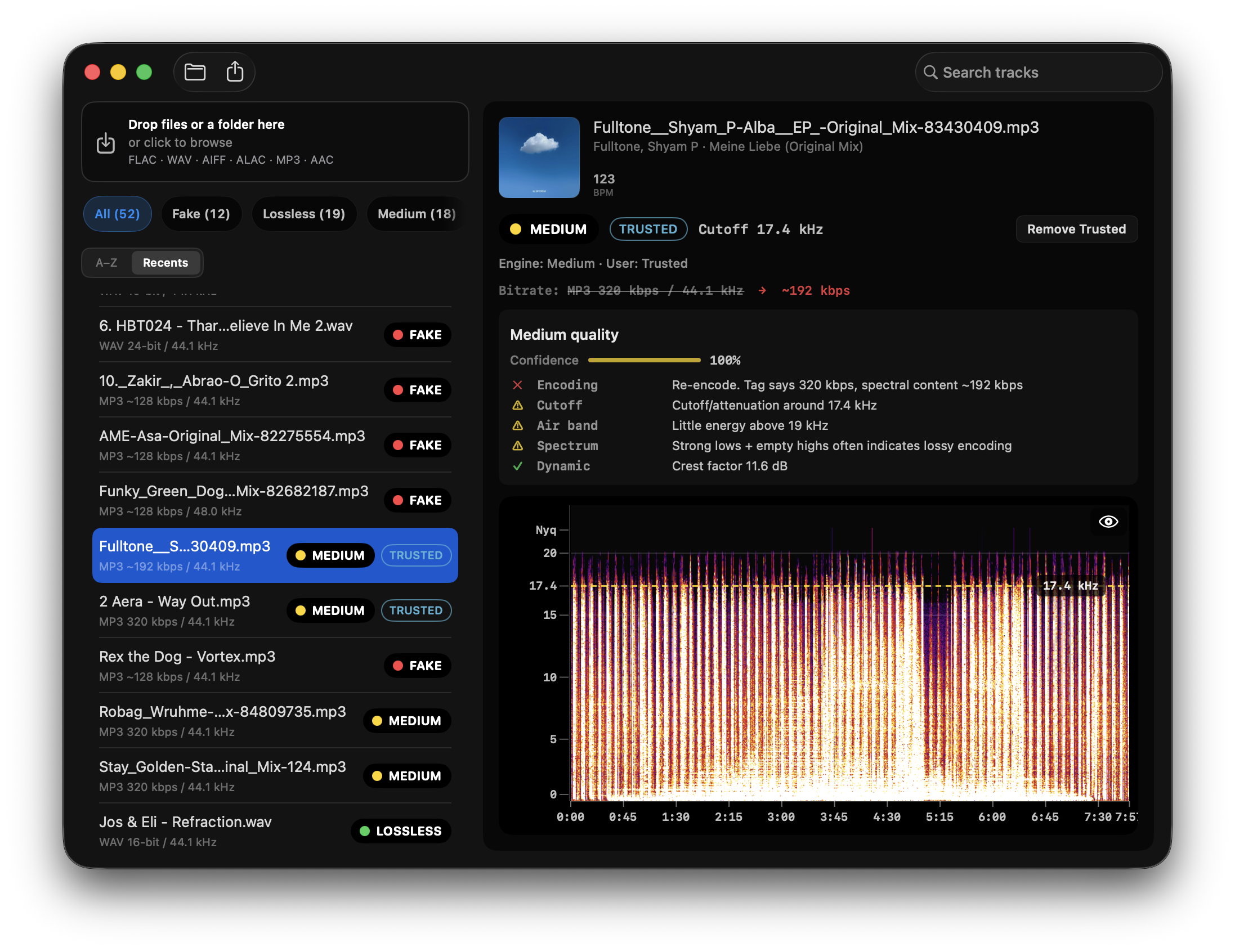
The difference is unambiguous at 128 kbps source material. It becomes harder to see visually at 192 kbps source material (cutoff ~19 kHz), where the gap between the cutoff and the Nyquist limit is only 3 kHz. This is why automated spectral analysis outperforms manual inspection for mid-bitrate cases. The differences are consistent but subtle.
A second example in the same crate: the tag still says 320 kbps, Spectro reads ~192 kbps, and the cutoff sits at 17.4 kHz.
Why does this matter in practice for DJs?
The most common scenario is not deliberate fraud. It is accidental degradation in the distribution chain. A label uploads a 128 kbps master to a distribution platform. The platform converts everything to a standard format. The file lands in a record pool labeled 320 kbps WAV. Nobody checks.
On consumer monitors or earbuds, a 128-sourced 320 kbps file is often indistinguishable from a genuine one. On a high-end club system. Funktion-One, d&b, L-Acoustics. The missing high-frequency energy and the encoding artifacts in the 8–12 kHz range are reproducible enough to affect the perceived quality of a mix.
The practical consequence: a file labeled "320 kbps WAV" is not a quality guarantee. The only verification is spectral analysis.
How does Spectro handle this case?
Spectro reads the frequency cutoff of every file and compares it against the expected profile for the declared bitrate and format. A WAV file with a 16 kHz cutoff is FAKE. Regardless of whether the metadata says 128 kbps or 320 kbps. A file with a cutoff in the 19–20 kHz range receives a MEDIUM verdict with an explicit note: the spectrum is consistent with either a 256 kbps CBR or a high-quality VBR encode, and the two cannot be distinguished reliably.
Spectro does not guess in the ambiguous range. It tells you what it can and cannot determine.
For more on how detection works across all formats, see How to Detect Fake Lossless Audio Files on Mac. For the visual fingerprint of a fake file in a spectrogram, see MP3 Disguised as WAV.
Related posts
Try Spectro free
100 tracks free. No account needed. Personal $24.99 for 1 Mac; Duo $39 for up to 2 Macs.
Download the free 100-track trial