 Spectro
Spectro Team · April 29, 2026 · 11 min read
Fakin' the Funk Alternative for Mac: Spectro for Fast Lossless Checks
Looking for a Fakin' the Funk alternative for Mac? Compare Spectro's native macOS workflow for fast fake-lossless checks, batch scans, and DJ library triage.
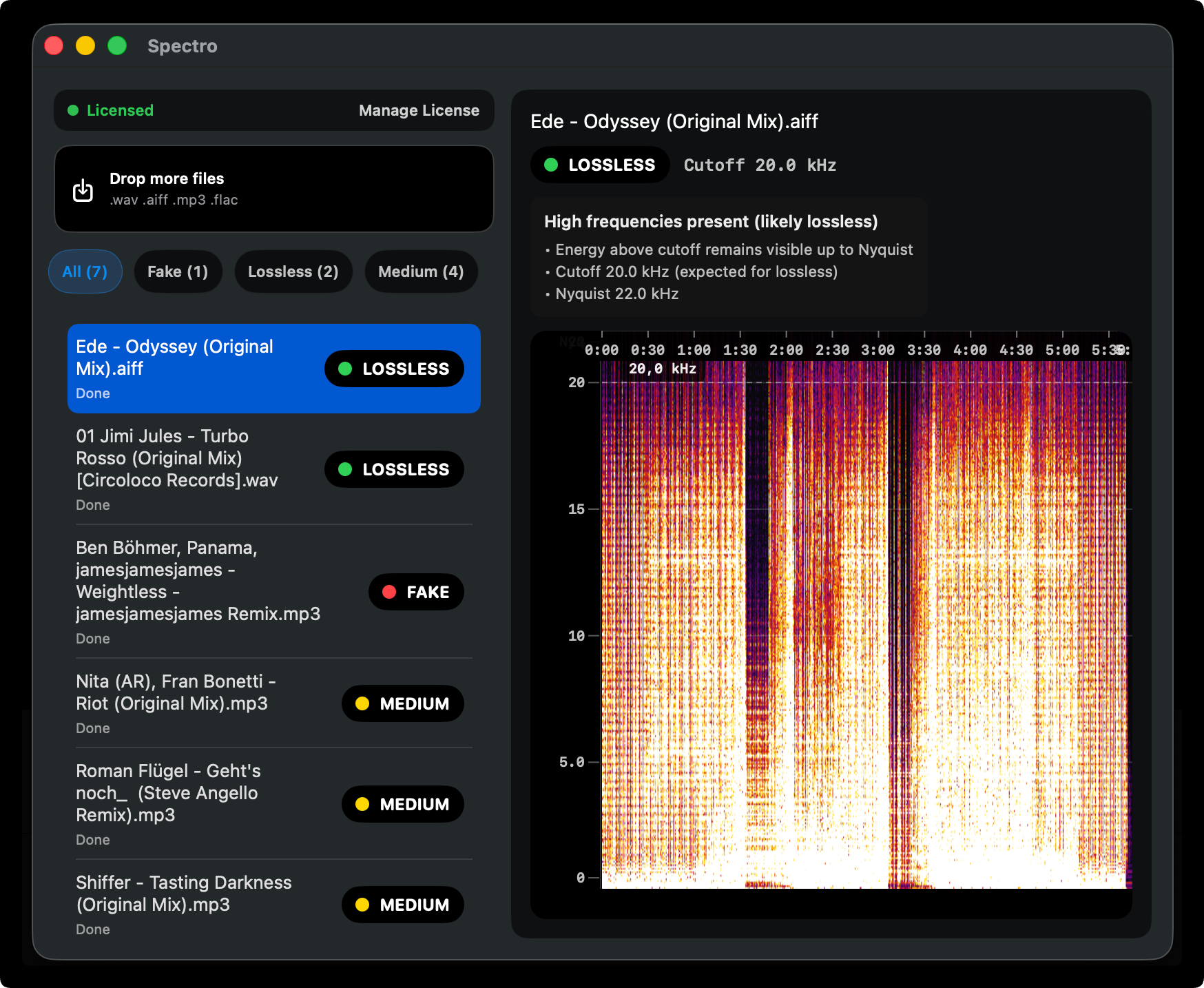
Quick Answer: Yes. Spectro is a native macOS fake lossless checker and Spek alternative with automatic verdicts. A Mac-first Fakin' the Funk workflow alternative. FtF runs on Mac and remains capable (especially for Windows-centric users). Spectro differs with offline batch scan of an entire DJ folder, automatic LOSSLESS/FAKE/MEDIUM verdicts, Finder tags, Rekordbox XML import, a 100-track free trial, and lifetime licenses from $24.99 (Personal, 1 Mac) or $39 (Duo, 2 Macs).
If you have ever searched for Fakin' The Funk on Mac, you have probably seen mixed answers. Fakin' The Funk (often shortened to FtF) is one of the most respected tools in the DJ world for spotting transcoded audio, and it does run on Mac. This page does not claim otherwise. For many Windows DJs, it is still a good choice. This guide is for Mac users who want a workflow that feels native to macOS: fast local offline batch scans, clear automatic verdicts, Finder-friendly triage, Rekordbox XML import, and enough spectrogram visibility to understand the evidence behind a result.
Is there a Fakin' the Funk alternative for Mac?
Yes. Spectro is a native macOS app for checking audio files and spotting evidence of fake lossless files. It is designed for DJs, collectors, and audio professionals who want a fast local workflow rather than uploading tracks to an online checker.
Can Spectro confirm that a file came from a true lossless master?
No. Spectro can highlight spectral evidence that a file may have been transcoded from a lossy source, but no spectrogram tool can guarantee the history or provenance of the original master.
What is Fakin' The Funk?
Fakin' The Funk is a fake-lossless detection tool designed to detect fake lossless audio: files sold or labeled as WAV, FLAC, or AIFF that were actually created from a lossy source such as MP3. It analyzes the spectral content of each file, looks for the hard frequency cutoffs that lossy encoders leave behind, and assigns a verdict so you do not have to read every spectrogram by hand.
In practice, FtF is used for batch library audits. You point it at a folder, it processes many files in sequence, and you get a clear signal about which tracks are suspicious. That workflow made it a reference point in online DJ forums for years, especially among Windows users who buy large catalogs from download stores and want a second line of defense before a gig.
The tool fits a specific mental model: trust nothing at face value. A store page can say “lossless,” a file can show a .wav extension, and your DJ software can still play the track without complaint, but none of that proves the audio was ever lossless end-to-end. FtF exists to close that gap with objective spectral evidence, at scale.
The limitation for this guide is not that FtF is unavailable on Mac, it does run on macOS. The issue is workflow fit. Many Mac users prefer a tool that behaves like a focused macOS utility: drag in a folder, check the evidence, tag suspicious files, and move back to Finder or DJ prep without learning a separate scoring system.
Why do Mac users need an alternative?
Most professional DJ software, Rekordbox, Serato, Traktor, runs on both platforms, but audio utility ecosystems split. FtF does run on Mac, but it still feels designed for a Windows-first workflow, and that becomes obvious when you are scanning hundreds of large WAV files before a deadline.
Because of that mismatch, many Mac users still fall back on:
- Manual spectrogram viewers (e.g. Spek, Sonic Visualiser): powerful, but slow when you need a verdict on every file in a crate.
- Web-based upload checkers: convenient for one-off files, but a non-starter for unreleased promos or large folders where you do not want files leaving your machine.
- DAW spectrum analyzers: great for production, not optimized for triaging a download folder in five minutes.
For USB prep on a MacBook the missing piece is not detection itself, FtF already detects well, but a Mac-native workflow around detection. In practice, DJs often want fewer interpretation steps, tighter Finder-oriented triage, and an interface framed around fast library prep rather than a broader utility workflow.
Another angle is time on the calendar. The night before a gig is the wrong moment to discover you should have budgeted two hours for manual checks. A Windows-first workflow can be productive once learned, but Mac users often want fewer interpretation steps and tighter OS integration. That is why a dedicated Mac tool still matters even when FtF is available on macOS.
What should Mac users use instead?
The closest match for that workflow on macOS today is Spectro.
Spectro is a native macOS app (Apple Silicon and Intel) built specifically around fake lossless detection for DJ libraries. Like FtF, it is built on the idea that you should not trust the file extension alone: the spectrum tells the truth. You drag in a folder of WAV, AIFF, FLAC, MP3, Ogg Vorbis, or Opus files; Spectro analyzes each one offline; and you get an automatic LOSSLESS/FAKE/MEDIUM verdict per file, plus optional Finder tags so you can see problems at a glance in the same file browser you already use for Rekordbox or Serato prep. You can also import a Rekordbox XML export when you want to scan the files behind an existing collection without rebuilding paths by hand.
Everything runs offline on your Mac. Batch scan an entire DJ folder with no upload queue and no account required for the 100-track trial. After the trial, paid plans start at $24.99: Personal for 1 Mac or Duo for up to 2 Macs at $39. That matters when your folder contains promos, edits, or anything you do not want on a third-party server.
Spectro is also tuned for how DJs actually organize music: scan a download folder, filter by FAKE or MEDIUM, tag or replace problem files, then move on to analysis and USB export in Rekordbox or Serato. The goal is not to replace your ears, it is to remove silent landmines from the library before they hit a club PA.
If you are new to the underlying idea of transcoded “lossless” files, start with How to detect fake lossless audio files on Mac or the focused fake lossless checker for Mac page before diving into tool comparisons.
How does Spectro compare to Fakin' The Funk?
Both tools target the same core problem: lossy audio hiding inside a lossless container. They share some fundamentals, batch-oriented checks and local processing, but diverge in how they communicate results and how naturally they fit a Mac workflow.
| Workflow factor | Spectro | Fakin' the Funk |
|---|---|---|
| Best platform fit | Native Mac workflow for Apple laptops and Finder-based library prep | Strong established choice for Windows users; Mac support is available |
| Batch workflow | Drag in folders and review LOSSLESS / FAKE / MEDIUM verdicts | Batch-oriented fake-lossless checks |
| Spectrogram visibility | Shows the evidence behind suspicious verdicts so you can inspect cutoffs | Provides analysis output; verify current UI details before relying on exact comparisons |
| DJ library use | Built around pre-gig triage, Finder tags, and fast replacement decisions | Popular in DJ communities for fake-lossless checking |
| Local/private analysis | Runs locally on macOS; no upload required | Runs locally; no upload required |
| Pricing model | 100-track free trial; from $24.99 (Personal) / Duo $39 | Paid license; check Fakin' the Funk's site for current price and terms |
| Windows availability | Not available for Windows yet; join the Windows waitlist | Good option for Windows users |
The honest summary: both tools can help identify suspicious fake-lossless files. If you already use Fakin' the Funk on Windows and like it, there is no reason to switch for Spectro. If you work primarily on Mac and want a focused lossless audio checker that fits Finder and DJ-library prep, Spectro is the better workflow fit.
One more thing worth noting: some competing tools include broader library-management features. Spectro intentionally stays focused. It exists to answer one question, does this file show evidence of fake lossless audio?, and to answer it clearly, locally, and quickly on Mac. If you want a library manager, use a dedicated library manager. If you want a fast, honest verdict before a gig, that focus is the point.
What Spectro does not do
Spectro is not a Windows app today. If you are on Windows, Fakin' the Funk may be the better immediate option; you can also join the Spectro Windows waitlist if you want to register interest.
Spectro also does not prove that a file came from an original lossless master. It reads spectral evidence and flags suspicious cutoffs or artifacts. That can be very useful for triage, but provenance still depends on trusted sources, purchase history, and the way the file was mastered or transferred.
Finally, Spectro is not trying to replace broader tools for tagging, renaming, cover art, loudness normalization, or DJ library management. It is a focused Mac checker for fake-lossless evidence.
What detection method does Spectro use?
Spectro uses spectral frequency analysis to look for the fingerprint of lossy encoding: a hard cutoff in energy above a certain frequency (often in the 16–20 kHz range, depending on the original MP3 bitrate), instead of the gradual rolloff you expect from a genuine high-resolution or CD-quality lossless master.
The approach is grounded in peer-reviewed work on transcoding detection (D'Alessandro & Shi, ACM MM&Sec 2009), which reported 99% accuracy across a large test set of songs, the same research lineage Spectro cites for its methodology. MEDIUM exists for the ambiguous band where very high-bitrate lossy encodes can resemble some genuine masterings; Spectro flags those explicitly instead of forcing a wrong binary guess.
Spectro v1.4 extended the engine with four specific improvements. Multi-segment analysis prevents classical and acoustic recordings from being flagged as fake when natural high-frequency rolloff occurs across the track, a known weak point of earlier detection tools. An adaptive threshold adjusts the spectral floor based on each file's signal characteristics rather than using a fixed cutoff, reducing false positives on piano and sparse instrumentation. Upsampling detection identifies the characteristic gap left when 44.1 kHz audio is resampled to 48 kHz. And three diagnostic signals, crest factor, clipping, and stereo correlation, are surfaced alongside the verdict for every file, giving you additional context without requiring you to interpret raw metrics.
For a full walkthrough of how to read cutoffs yourself, and when a “suspicious” spectrum might still be a false positive, see How to detect fake lossless audio files on Mac. If you are comparing manual spectrogram tools too, read Best Spek alternatives for Mac and the focused Spek alternative for macOS page.
If you want the short version: a FAKE result means the spectrum looks like lossy audio was wrapped in a lossless container; LOSSLESS means the high-frequency behavior matches a genuine lossless source; MEDIUM means the file sits in a gray zone where guessing would be irresponsible, so Spectro tells you explicitly instead of hiding the uncertainty.
Is Spectro the right tool for you?
Yes, if: you work on macOS, you buy or collect lossless files from multiple sources, and you want automatic batch verdicts without manually opening every file in a spectrogram viewer before your next export to USB.
No replacement needed if: you already use Fakin' The Funk on Windows and are happy with it. FtF is established and capable there. If you work primarily on Mac and want a tool designed from the ground up for that workflow, Spectro is the better fit.
Also consider: if you only need a quick browser check on a single file, a web tool may be enough; for library-scale privacy and speed on Mac, a native app wins. For DJ-specific workflows, see Audio quality checker for DJs, or browse the full audio quality guides hub.
Finally, remember that no automated tool replaces provenance. If you know a file came straight from a trusted mastering engineer or a label’s official lossless delivery, you may still see edge cases (mastering filters, vinyl captures, unusual sample rates). The point of a FtF-style workflow, whether on Windows or Mac, is to catch the boring, common failure mode: MP3 → “WAV” sneaking into a set list because nobody looked.
More on Mac workflows: Lossless audio checker for Mac · Fake lossless checker for Mac · How to detect fake lossless audio files on Mac · Best Spek alternatives for Mac in 2026 · Audio quality checker for DJs · Guides
Related posts
Try Spectro free
100 tracks free. No account needed. Personal $24.99 for 1 Mac; Duo $39 for up to 2 Macs.
Download the free 100-track trial