 Spectro
Lossless audio checker for macOS
Check WAV, AIFF, and FLAC Files Locally on Mac
Spectro is a macOS lossless audio checker for DJs, collectors, and audio pros. Drag in a folder of WAV, AIFF, FLAC, or other supported formats, keep files private on your Mac, and get a LOSSLESS, FAKE, or MEDIUM verdict for every track. 100 tracks free. Personal $24.99 for 1 Mac; Duo $39 for up to 2 Macs. One-time purchase.
30-day money-back guarantee
Used by DJs in 15+ countries · Native Apple Silicon · Files never uploaded
In short
A lossless audio checker for Mac analyzes WAV, AIFF, FLAC, and other supported files for signs that a lossless label may hide a lossy source. Spectro flags suspicious files locally. Without uploading your library. For fake-lossless workflow copy, see the dedicated fake lossless checker for Mac. For FLAC authenticity only, use the fake FLAC detector.
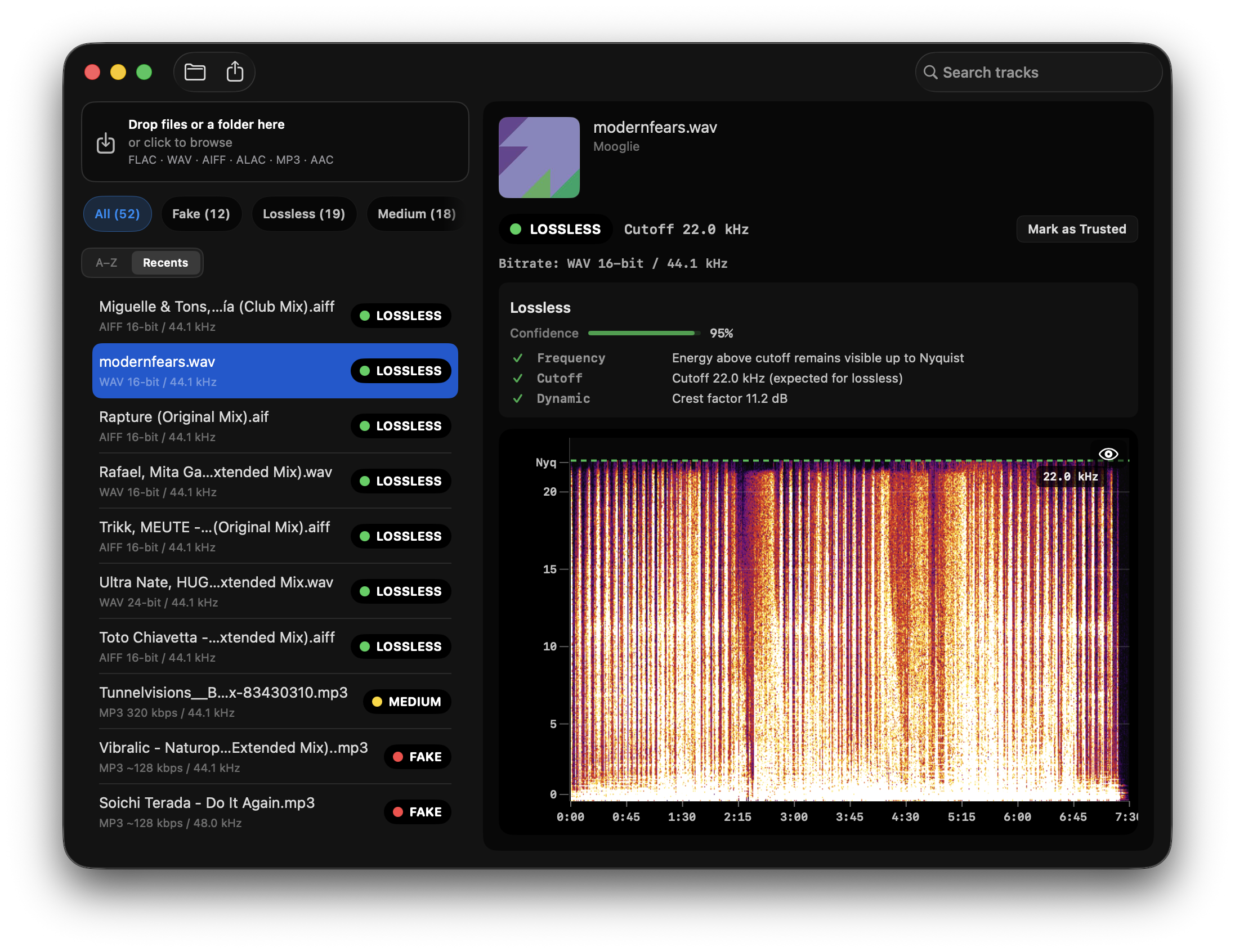
Spectro scanning a DJ library. Genuine lossless energy reaches Nyquist. Fake and Medium files stay visible in the same crate.
What is a lossless audio checker?
A lossless audio checker analyzes audio files for signs that a file labeled FLAC, WAV, or AIFF may have come from a lossy source. Spectro uses spectral evidence to flag suspicious files locally on macOS.
Is an online lossless checker required?
No. A local Mac app can check files without uploading your music library. Spectro is designed for local analysis, which is useful for DJs and collectors with large libraries or private unreleased tracks.
Manual check vs Spectro
| Feature | Manual check | Spectro |
|---|---|---|
| Works on entire folders at once | ✗ | ✓ |
| Automatic verdict. No interpretation needed | ✗ | ✓ |
| Supports WAV, AIFF, FLAC, MP3, AAC | Varies | ✓ |
| Native Apple Silicon | Varies | ✓ |
| Finder tag integration | ✗ | ✓ |
| Offline. Files never uploaded | ✓ | ✓ |
| Free to try | ✓ | ✓ (100 tracks) |
Online checker vs local Mac app
Online lossless checkers work fine for a single file. If you have a DJ library, they don't scale.
| Task | Online checker | Spectro |
|---|---|---|
| Check 1 file | ✓ | ✓ |
| Check 500 files at once | ✗. One at a time | ✓. Drag folder in |
| Automatic verdict. No spectrogram reading | ✗. Manual interpretation | ✓ |
| Works offline, no browser needed | ✗ | ✓ |
| Rekordbox / Finder integration | ✗ | ✓ |
| Tag fake files with color labels | ✗ | ✓ |
| Export results to CSV | ✗ | ✓ |
| macOS native. No file size limits | ✗ | ✓ |
If you prep USB sticks before gigs, you're checking dozens of tracks at a time. Not one by one. Spectro scans an entire folder in seconds and returns a verdict per file automatically. No spectrogram reading. No manual work.
What Spectro can and cannot tell you
Spectro can flag evidence
- - Hard spectral cutoffs consistent with MP3/AAC sources.
- - Files where the container says WAV, AIFF, or FLAC but the spectrum is suspicious.
- - Batch-priority lists for DJ libraries, purchases, promos, and archive cleanup.
Spectro cannot prove provenance
Spectral analysis is evidence, not proof of the original master history. Mastering choices, old recordings, vinyl captures, and unusual sample-rate workflows can create edge cases, so use the verdict as a decision aid alongside trusted sources and listening.
Who this is for
- - DJs preparing USB sticks for club gigs who need to verify 50–100 tracks fast.
- - Collectors checking Bandcamp, Beatport, Traxsource, or promo-pool downloads.
- - Audiophiles who want to confirm a purchase before storing it permanently.
- - Producers checking files received from collaborators or sample packs.
What Spectro does
- - Reads the frequency spectrum of each file and detects the hard cutoff left by lossy encoding.
- - Returns LOSSLESS, FAKE, or MEDIUM verdict per file with a confidence score.
- - Batch scans entire folders. No opening files one by one.
- - Tags files in Finder with color labels for fast triage.
FAQ
What does a lossless audio checker actually check?
It analyzes the frequency spectrum of each audio file and looks for a hard cutoff above 15 kHz. The fingerprint left when a lossy encoder like MP3 discards high-frequency data. Genuine lossless files have energy that gradually rolls off toward 22 kHz. Fake lossless files show a flat wall at the original encoder's cutoff point.
Is losslessaudiochecker.com still working?
The original Lossless Audio Checker project is no longer maintained and the site no longer offers the tool. Spectro is a native macOS app actively maintained in 2026, with support for Apple Silicon, batch processing, and automatic verdicts.
Can I check FLAC files as well as WAV?
Yes. This page is a generic Mac lossless checker for WAV, AIFF, FLAC, and other supported formats. For FLAC authenticity only, use the fake FLAC detector. For the Mac fake-lossless workflow, use the fake lossless checker for Mac.
How accurate is Spectro at detecting fake lossless files?
Spectro's detection method is based on peer-reviewed research (D'Alessandro & Shi, ACM MM&Sec 2009) that achieved 99% accuracy on transcoding detection across 2,512 songs. The only ambiguous case is 256 kbps CBR vs. high-quality VBR, which Spectro flags explicitly as MEDIUM rather than guessing.
Related guides
- How to detect fake lossless audio files on Mac
- What is fake lossless audio?
- Fake lossless checker for Mac
- Audio quality checker for DJs
- Audio quality and fake lossless guides
- Spectro for Windows waitlist
- AudioChecker alternative for Mac
- Fake FLAC detector for Mac
- Spek alternative for macOS
- Best Spek alternatives for Mac in 2026
Spectro is an independent macOS app.