 Spectro
Spectro Team · April 20, 2026 · 11 min read
Best Spek Alternatives for Mac in 2026: Visual + Batch Comparison
Listicle: compare Spek alternatives for Mac in 2026. Visual spectrogram tools, batch lossless checkers, and DJ-friendly options. Not a buy page.
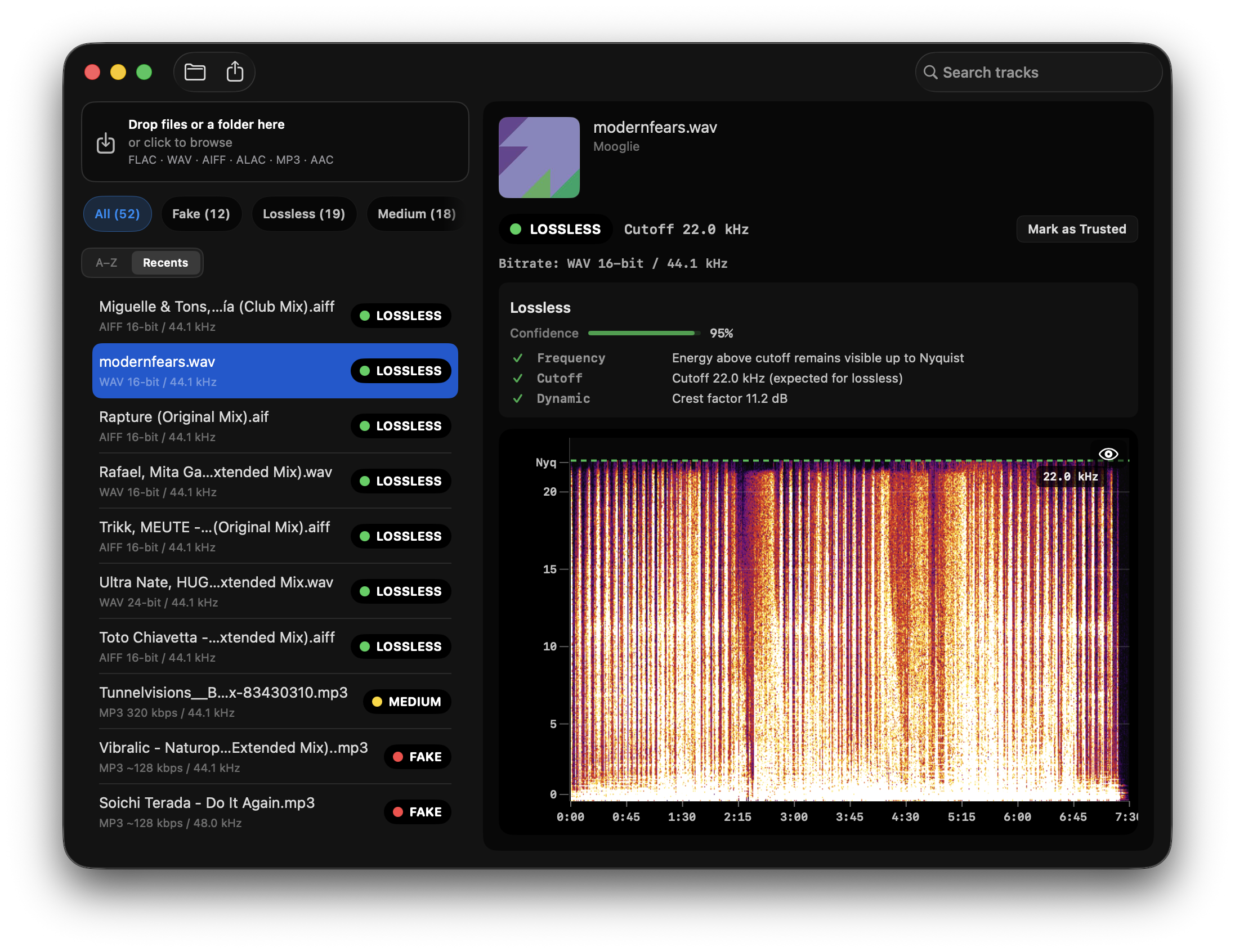
Quick Answer: This is a comparison of Spek alternatives for Mac, not a product landing. Spek is still useful for one-off visual spectrogram inspection. If you need to check a folder of tracks and spot likely fake lossless files quickly, Spectro is the stronger Mac option because it combines spectrogram-based evidence with batch verdicts. To buy or try Spectro, use the Spek alternative landing. For a head-to-head, see Spectro vs Spek.
If you've tried to run Spek on a modern Mac lately, you already know the tradeoff. Spek can work on macOS via Homebrew (brew install spek) or community forks such as spek-X. The limitation is not only compatibility. It is workflow.
This guide compares the best Spek alternatives for Mac in 2026: what each tool does well, where it falls short, and when to use a manual spectrum analyzer versus a batch lossless audio checker.
What is the best Spek alternative for Mac?
For Mac users who only need to inspect one file visually, Spek can still be useful. If you need a maintained macOS app for checking batches of tracks and spotting likely fake lossless files, Spectro is a stronger option because it combines spectrogram-based evidence with a DJ-friendly workflow.
Spectrogram analysis is evidence, not proof of original master provenance. A tool can show suspicious cutoffs, low-pass filtering, or artifacts that suggest a lossy source, but it cannot prove the complete history of a file.
Does Spek work on Mac?
Yes. Spek runs on macOS via Homebrew (brew install spek), and community forks can help on newer Macs. If you're comfortable installing software from the terminal, Spek can still be useful.
The reason DJs look for alternatives is that Spek shows you the spectrogram and stops there. Identifying a fake lossless file means knowing what a frequency cutoff looks like, zooming to the right range, and making a judgment call. For one file that's manageable. For a library of 200 tracks before a gig, it doesn't scale.
Why are DJs looking for Spek alternatives on Mac?
Spek was, for a long time, the go-to tool for checking audio quality. Drop a file in, see the spectrogram, look for the frequency cutoff. Simple and effective.
The problem is the ecosystem moved on. macOS introduced stricter notarization expectations. Apple Silicon changed how apps are compiled and distributed. Spek is open-source and still maintained by the community, but its core workflow has not changed: one file at a time, manual spectrogram reading, no verdict. A few forks exist on GitHub, spek-X, spek-alternative, but they do not turn Spek into a batch fake-lossless checker.
That is why DJs, audiophiles, and music producers compare Spek with tools built for modern Mac workflows.
Quick comparison: Spek alternatives for Mac
| Tool | Best for | Mac status | Verdicts | Batch checks | Cost |
|---|---|---|---|---|---|
| Spek | One-file visual spectrogram checks | Works via Homebrew/community builds | No, manual interpretation | No | Free |
| Spectro | DJ library audits and fake lossless triage | Native macOS app | Yes: LOSSLESS, FAKE, MEDIUM | Yes | 100-track trial, then from $24.99 / Duo $39 |
| Fakin' the Funk | Windows-first batch fake lossless detection | Mac support available; verify current requirements | Yes | Yes | Paid |
| Sonic Visualiser | Research-grade visual analysis | Native Mac app | No, manual interpretation | No practical fake-lossless workflow | Free |
| Lossless Audio Checker | Terminal-based checks | Command line on Mac | Yes, with caveats | Yes, if comfortable with CLI | Free |
| Ocenaudio | Audio editing with spectrogram view | Native Mac app | No, manual interpretation | No | Free |
If your intent is mainly commercial, “I want the closest modern Mac replacement for Spek”, the focused landing page is Spectro as a Spek alternative for Mac. This blog post stays broader: it compares options and explains when each tool makes sense.
What are the best Spek alternatives for Mac?
Spectro (macOS, from $24.99 one-time)
Spectro is the most direct Spek replacement for Mac users who work with music libraries. It was built specifically to help identify fake lossless files, tracks labeled as WAV, AIFF, or FLAC that show evidence of having come from a lossy source.
The key difference from Spek is that Spectro does not just show you the spectrogram and ask you to interpret it. It gives you a verdict: LOSSLESS, FAKE, or MEDIUM, based on spectral evidence such as where the frequency content appears to end.
Drag in a folder of tracks and Spectro processes them in batch, flags suspicious files, and lets you filter by result. For DJs preparing for a gig, that is the workflow: less opening files one by one, more quick triage before tracks reach your USB or library.
What it does well:
- Automatic verdicts, no manual spectrogram interpretation required for every file
- Batch processing for entire folders
- Native macOS app for Apple Silicon and Intel Macs
- Fully offline, your files never leave your machine
- 100-track free trial, no account required
For a head-to-head with Spek itself, read our Spectro vs Spek comparison. If you are comparing Mac tools against Windows-first fake-lossless software, see the Fakin' the Funk alternative for Mac.
What it doesn't do:
- It is not a general-purpose audio editor. If you need to annotate audio, measure loudness, or do detailed musicological analysis beyond quality triage, use a broader analyzer or editor.
Best for: DJs and audiophiles who want to audit a library quickly, without learning to read every spectrogram manually.
Spectro is the Mac-focused Spek replacement with batch checks and a 100-track free trial.
Spek (free, open-source)
Spek remains useful when you want a quick visual spectrogram for a single file. It is simple, free, and familiar to many people who learned fake-lossless detection by looking for hard frequency cutoffs.
Its weakness is workflow. Spek does not explain the result, compare files in bulk, or produce a verdict. If you are checking one suspicious track, that may be enough. If you are validating a playlist, crate, or download folder, the manual process becomes the bottleneck.
Best for: One-off visual checks when you already know how to read a spectrogram.
Fakin' the Funk (Windows-first)
Fakin' the Funk is already well-known for batch fake-lossless detection and is a strong option for many Windows users. If you are on macOS and want the closest native workflow, read our dedicated Fakin' the Funk alternative for Mac.
For Mac users, the main issue is not whether batch fake-lossless detection is useful, it is. The issue is platform fit. Running a Windows-first tool is friction when your music library, Finder workflow, and DJ prep all happen on a Mac.
Best for: Windows users who want batch fake-lossless detection, or Mac users comparing what an equivalent native workflow should include. If you specifically searched for Spectro on Windows, see the Windows waitlist. Spectro is macOS-only today and there is no promised Windows release date.
Sonic Visualiser (free, open-source)
Sonic Visualiser is a powerful, research-grade audio analysis tool maintained by the Centre for Digital Music at Queen Mary University of London. It runs natively on macOS and receives regular updates.
It can display spectrograms, waveforms, chromagrams, and many other representations. If you need to analyze audio in depth, for music research, production, or education, this is the most capable free tool available.
The trade-off is complexity. To detect fake lossless files, you need to add the spectrogram layer, configure the frequency scale, zoom to the right range, and visually identify the cutoff. There is no simple DJ-library verdict workflow.
Best for: Music researchers, producers, and technically curious users who want deep analysis on individual files.
Lossless Audio Checker (free)
Lossless Audio Checker (LAC) checks whether a FLAC or WAV file shows evidence of being genuinely lossless by detecting frequency cutoffs programmatically.
On Windows it has a GUI. On macOS it is command-line only, you run it from Terminal with the path to your file or folder. For non-technical users that is a dealbreaker. For those comfortable with Terminal, it can be a solid free option.
Reliability can vary in edge cases. High-bitrate MP3s converted to FLAC, certain mastering styles, old recordings, and vinyl rips can create ambiguous results. If you want a Mac-native explanation of checker tradeoffs, start with our lossless audio checker page or the fake lossless checker for Mac.
Best for: Technically comfortable macOS users who want a free command-line option and do not mind occasional edge cases.
Ocenaudio (free)
Ocenaudio is a cross-platform audio editor that includes spectrogram analysis. It is easy to use and runs well on macOS, including Apple Silicon.
For fake lossless detection it works similarly to Sonic Visualiser: open the file, view the spectrogram, check where the frequency content ends. No automatic fake-lossless verdict, no DJ-focused batch mode. It is an audio editor first, analyzer second.
Best for: Users who already need an audio editor and want spectrogram analysis as an additional feature, not a primary use case.
When Spek is enough / when Spectro is better
Spek is enough when:
- You only need to inspect one or two files.
- You already know what a lossy cutoff looks like.
- You want a free visual spectrogram and do not need a verdict.
- You are learning the basics of spectral analysis before choosing a workflow.
Spectro is better when:
- You need to check a folder, playlist, or DJ crate before a gig.
- You want automatic LOSSLESS / FAKE / MEDIUM triage instead of manual interpretation.
- You prefer a native, offline macOS app for unreleased promos or purchased downloads.
- You want a repeatable workflow for checking new downloads before they enter your main library.
For deeper background on interpreting cutoffs and ambiguous results, see the Spectro guides.
Can a Spek alternative prove a FLAC is truly lossless?
No. A spectrogram can show evidence such as frequency cutoffs, low-pass filtering, or suspicious artifacts that suggest a lossy source, but it cannot prove the provenance of the original master.
That distinction matters. A file can show clean high-frequency content and still have an uncertain supply-chain history. Conversely, a genuinely lossless file can have limited high-frequency content because of the recording, mastering, source medium, or artistic processing. Treat spectral analysis as practical evidence for triage, not a certificate of origin.
Which one should you use?
If you're a DJ preparing music for a gig or auditing a library of hundreds of files: Spectro. The batch processing and automatic verdicts are built for exactly that use case. Paid plans start at $24.99 (Personal, 1 Mac) or $39 (Duo, up to 2 Macs) and can pay for themselves the first time they catch a suspicious WAV before it reaches a club system.
If you're a music researcher or producer who needs to analyze individual tracks in depth: Sonic Visualiser. It is free, actively maintained, and extremely capable.
If you're comfortable in Terminal and want a free batch option: Lossless Audio Checker. Be aware of the macOS-specific limitations and ambiguous edge cases.
If you need an audio editor that also shows spectrograms: Ocenaudio.
Spek works for visual inspection. What it does not do is tell you whether a file is likely fake lossless, it shows you the spectrogram and leaves the interpretation to you.
Are there free alternatives to Spectro?
Yes. Spek and Sonic Visualiser are both free and work on macOS. Lossless Audio Checker is also free if you are comfortable with the command line. Browser-based tools can help for occasional single-file checks, but they usually do not match a local batch workflow for a large music library.
Compare offline Mac checking, batch triage, and fake-lossless edge cases.
Related posts
Try Spectro free
100 tracks free. No account needed. Personal $24.99 for 1 Mac; Duo $39 for up to 2 Macs.
Download the free 100-track trial