 Spectro
Spectro Team · April 19, 2026 · 8 min read
FLAC vs WAV vs AIFF for DJs: Best Format?
FLAC vs WAV vs AIFF for DJs: what actually differs on USB, CDJs, and storage. All three are lossless. The real question is whether the file is genuine.
Quick Answer: For DJs, the practical differences between FLAC, WAV, and AIFF are minimal, all three are lossless and all are supported by Rekordbox, Serato, and Traktor. The format matters far less than whether the file is genuinely lossless. A fake WAV sounds worse than a real 320 kbps MP3 on a high-end club system.
If you ask ten DJs which audio format they use, you'll get at least four different answers and probably a mild argument. WAV is the standard. AIFF is what Mac users swear by. FLAC is what audiophiles insist on. MP3 is what everyone actually has in their library whether they admit it or not.
The honest answer is that for DJs, the differences between lossless formats are smaller than most people think - and the question that actually matters isn't which lossless format you use, but whether your files are genuinely lossless in the first place.
Here's what you need to know.
What are the main lossless audio formats for DJs?
WAV (Waveform Audio File Format) The original uncompressed audio format, developed by Microsoft and IBM in 1991. WAV stores raw PCM audio with no compression. A 16-bit/44.1kHz stereo WAV is bit-for-bit identical to a CD. A 24-bit/44.1kHz WAV is what most modern music is delivered in from labels and distributors.
WAV has one limitation: the format has a 4GB file size limit due to its 32-bit header structure. For audio purposes this isn't a practical constraint - a 24-bit/44.1kHz stereo WAV would need to be over six hours long to hit it.
AIFF (Audio Interchange File Format) Apple's equivalent of WAV, developed in 1988. AIFF stores the same PCM audio data as WAV. The technical difference is byte order (big-endian vs little-endian) and some metadata handling. In practice, for music playback, AIFF and WAV are identical in quality.
AIFF has historically been the preferred format on macOS because it supports more robust metadata embedding. Many Mac-based DJs and producers default to AIFF for this reason.
FLAC (Free Lossless Audio Codec) Unlike WAV and AIFF, FLAC uses lossless compression - mathematical compression that reduces file size (typically by 50-60%) while preserving the audio data perfectly. Decompressing a FLAC file produces bit-for-bit identical output to the original uncompressed PCM. There is no quality loss.
FLAC is the standard format for audiophile music downloads and is widely used in the music collection community. It has full metadata support and no file size limitations.
MP3 and AAC Lossy formats that permanently remove frequency information to achieve smaller file sizes. A 320kbps MP3 sounds very close to lossless on most systems. A 128kbps MP3 has audible compression artifacts on high-quality playback. Once audio is encoded as MP3, the removed information cannot be recovered. For FLAC versus MP3 (not versus WAV), see Is FLAC Better Than MP3?.
How do FLAC, WAV, and AIFF compare for DJs?
Sound quality: WAV, AIFF, and FLAC are identical when the source material is the same. A track delivered as 24-bit WAV and converted to FLAC or AIFF contains exactly the same audio information. The format is a container - what matters is what's inside.
DJ software compatibility: WAV and AIFF have universal support across all DJ software and hardware. FLAC support has improved significantly - Rekordbox, Serato, and Traktor all support FLAC natively now, but some older CDJ firmware versions have limited or no FLAC support. If you play on club CDJs and are not sure about the firmware version, WAV or AIFF is the safer choice.
File size: FLAC is roughly half the size of WAV or AIFF for the same audio content. For a large library this is meaningful - 1TB of WAV becomes ~500GB in FLAC with no quality loss. For USB drives used for gigging, the difference is less significant since modern drives are large and cheap.
Metadata: AIFF and FLAC handle metadata (artist, title, album art, BPM, key) more robustly than WAV. WAV has historically had metadata compatibility issues across different software - metadata written by one application is sometimes not read by another. If you care about library management and tagging, AIFF or FLAC handle this better.
Streaming and CDJ performance: WAV and AIFF are uncompressed and can be read sequentially without decompression overhead. FLAC requires real-time decompression during playback. On modern hardware this is not an audible issue - the decompression is instantaneous - but on older CDJ models with limited processing power, WAV is technically safer.
What is the difference between FLAC, WAV, and AIFF for DJs?
| Format | Quality | Compression | CDJ Support | Metadata | File Size |
|---|---|---|---|---|---|
| WAV | Lossless | None | Universal | Limited | 100% |
| AIFF | Lossless | None | Universal | Good | ~100% |
| FLAC | Lossless | Lossless | Most modern | Excellent | ~50% |
| MP3 320 | Lossy | Lossy | Universal | Good | ~10% |
| MP3 128 | Lossy | Lossy | Universal | Good | ~4% |
FLAC vs AIFF: which should you choose?
Both FLAC and AIFF are lossless formats, the audio quality is identical. The choice comes down to three practical factors:
Storage: FLAC uses roughly 50% less disk space than AIFF for the same audio content. A 1TB AIFF library becomes ~500GB in FLAC with no quality loss.
Metadata: Both formats handle cue points, BPM, and key well. FLAC has slightly more robust tagging across different software ecosystems; AIFF has historically been the Mac-native standard and integrates cleanly with iTunes/Music metadata.
Hardware compatibility: AIFF has universal support on all CDJ hardware and firmware. FLAC works on all modern CDJ firmware but may fail on older units. If you play on unfamiliar club rigs and can't verify firmware versions, AIFF is the safer default.
For DJs on macOS managing a large library where storage matters: FLAC. For gigging on any hardware without assumptions: AIFF. There is no audio quality reason to prefer one over the other, both are genuinely lossless.
Does the audio format really matter for DJs?
Here's what most format debates miss: WAV, AIFF, and FLAC are interchangeable quality-wise. Converting between them is lossless - a WAV converted to FLAC converted back to WAV is bit-for-bit identical to the original.
The question that actually determines audio quality is not which lossless format you use. It's whether the file is genuinely lossless in the first place.
A file labeled WAV or AIFF that was converted from MP3 is worse than an honest 320kbps MP3. The format says lossless, but the audio was already degraded before the container was applied. This is the fake lossless problem - and it's far more common in DJ libraries than most people realize.
See What Is Fake Lossless Audio? for a full breakdown of how this happens and why it's more common than most DJs realize.
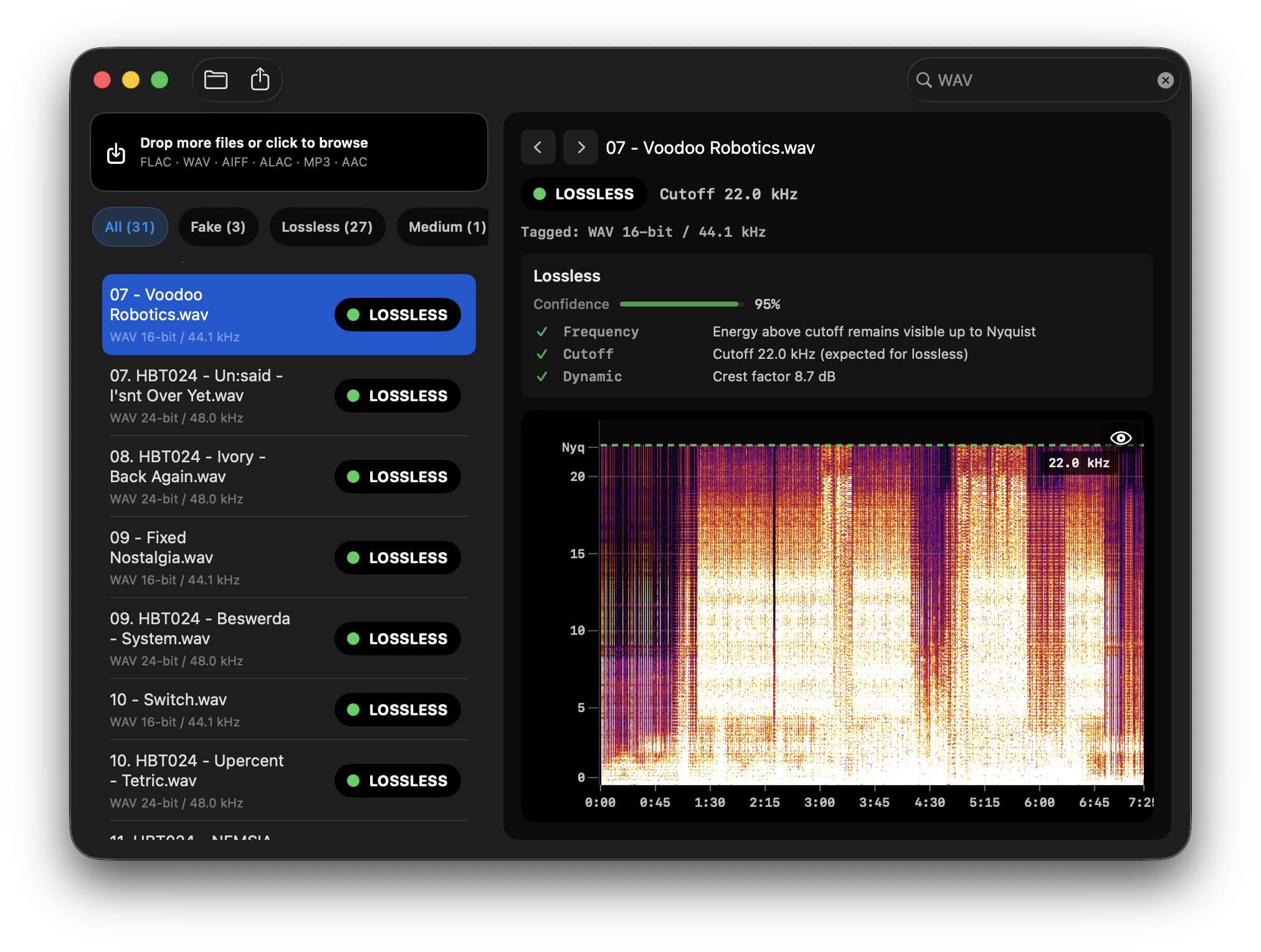
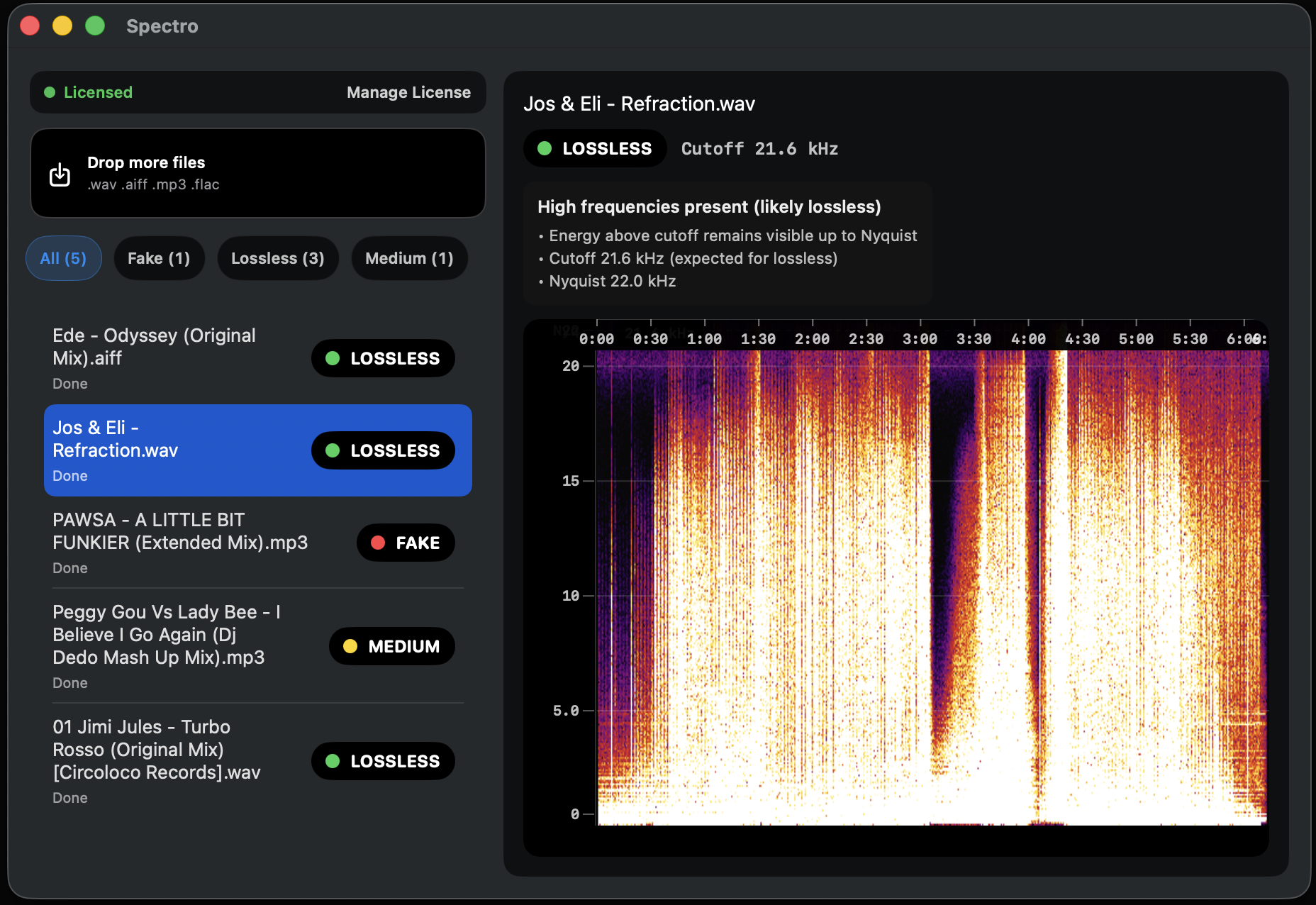
The only way to know if a lossless file is genuine is to analyze its frequency content. Lossy encoding permanently removes high frequencies, leaving a characteristic cutoff in the spectrogram. A genuine lossless file extends to the Nyquist limit (22 kHz for 44.1kHz audio). A fake lossless file shows a hard cutoff at 16-20 kHz depending on the original bitrate.
Lossless audio checker for Mac checks this automatically. It reads WAV, AIFF, FLAC, and MP3 files and returns a verdict - LOSSLESS, FAKE, or MEDIUM - based on spectral analysis. For a DJ library of any size, it's the fastest way to find out what you actually have.
For a detailed guide on how the detection works and how to read spectrograms manually, see How to Detect Fake Lossless Audio Files on Mac.
Which audio format should DJs actually use?
For new music purchases: Buy WAV or AIFF from Beatport (Is Your Beatport Download Actually Lossless?), Bandcamp, or direct from labels. These are universally supported, and most lossless stores deliver in these formats by default. If FLAC is available and you're managing a large library, FLAC is a perfectly valid choice with half the storage footprint.
For library management: Convert everything to a single format if consistency matters to you. WAV is the safest for hardware compatibility. AIFF is better for metadata. FLAC is best for storage efficiency. Quality is identical between all three.
For format conversion: Use a lossless converter - XLD on macOS is the standard choice. Never convert lossy to lossless (MP3 -> WAV achieves nothing). Convert lossless to lossless freely.
Most importantly: Run a quality check on your library. Format is secondary to whether the files are actually what they claim to be. A library of genuine 320kbps MP3s is more honest than a library of fake WAVs, and in most cases will sound better on a club system.
Related posts
Try Spectro free
100 tracks free. No account needed. Personal $24.99 for 1 Mac; Duo $39 for up to 2 Macs.
Download the free 100-track trial