 Spectro
Spectro Team · June 30, 2026 · 7 min read
How to Detect AI-Generated Music Files Before You Import a Crate
A practical pre-import workflow for DJs: staging folders, Spectro fake lossless, and optional AI Screen Beta that can flag some AI-platform tracks. Screening, not proof.
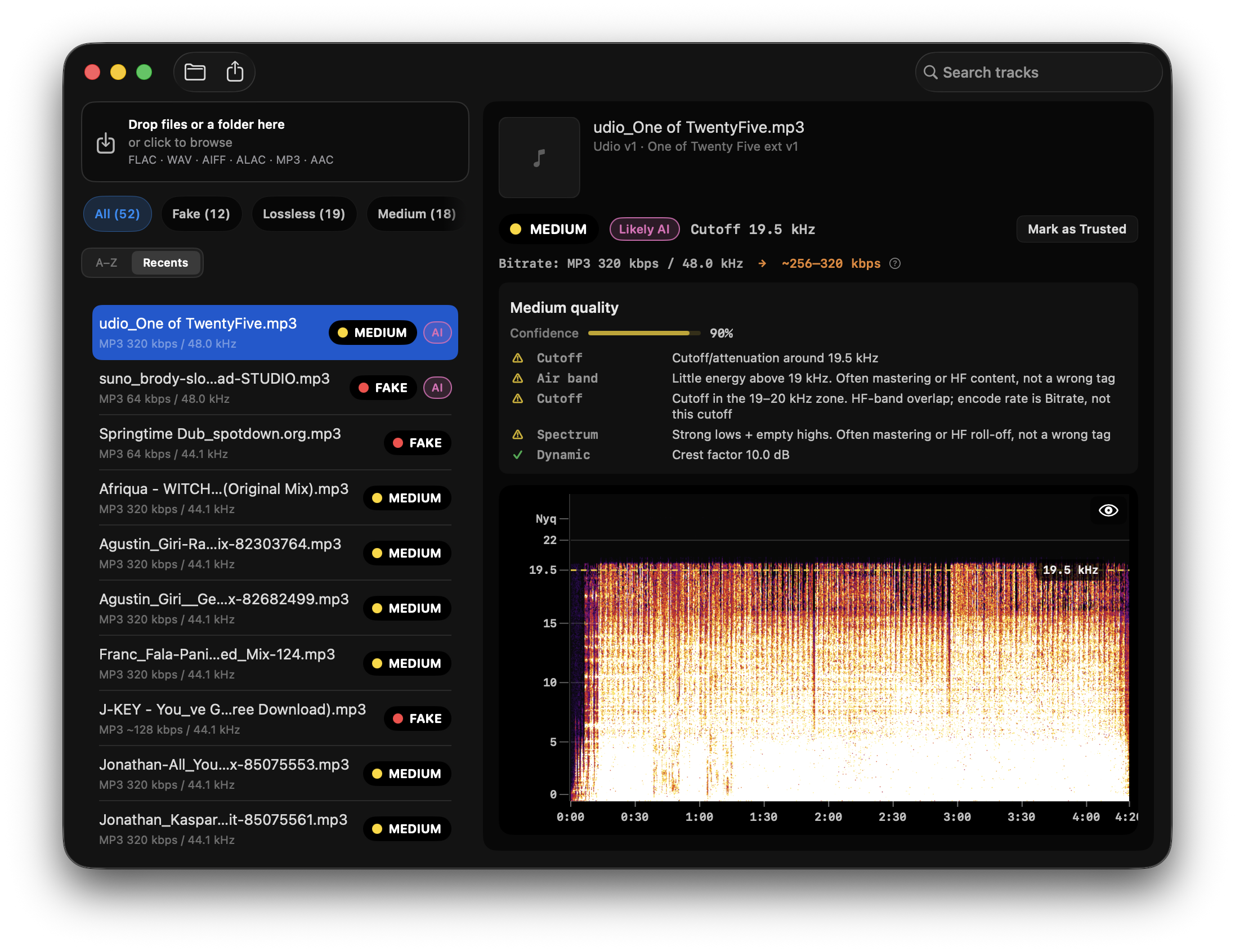
Quick Answer: To screen AI-generated music files before importing to DJ software, download to a staging folder, run fake lossless first, then turn on Spectro's optional AI Screen (Beta) for a local review flag. AI Screen can flag some tracks from AI music platforms (Possible AI / Likely AI). It is still Beta, off by default, and it does not change the LOSSLESS / FAKE / MEDIUM Verdict. Treat flags as signals, not proof. Listen, tag inconclusive files, and import only what you are willing to play.
Why check files before import instead of after?
Once a track is analyzed, tagged, and crate-assigned in Rekordbox, Serato, or Traktor, fixing it is tedious. Metadata propagates to USB exports, playlists, and backup drives. A file that should have been questioned at download time becomes buried under thousands of others.
Pre-import screening catches problems when replacement is cheap:
- Re-download from the store
- Swap for a different version
- Quarantine before it pollutes your main library
The same staging workflow applies to fake lossless detection and AI origin screening. Our DJ library audit guide documents the full quality-audit process; this guide extends it for the AI dimension.
What is the step-by-step pre-import workflow?
1. Create a staging folder
Never download directly into your main music library. Use ~/Music/Incoming/ or ~/Music/Beatport Staging/, one folder per purchase batch or promo pool drop.
2. Run fake lossless screening first
AI origin tools do not check whether a WAV is a transcoded MP3. Spectro processes entire folders offline on Mac and returns LOSSLESS, FAKE, or MEDIUM per file. Flag FAKE results for replacement before worrying about AI.
This step is fully supported today. See lossless audio checker: online vs. offline for why local batch scanning beats browser upload for library-scale work.
3. Run AI origin screening
On Mac, Spectro 1.6 adds optional AI Screen (Beta). Enable it in Settings. It is off by default. On subsequent scans it can flag some songs from AI music platforms for review, with an AI list tag and Possible AI / Likely AI in track detail. It does not change the Verdict, does not name Suno or Udio, and does not prove origin.
Web upload checkers remain useful for a second opinion on a single file. Evaluate any tool's false positive rate on your genre. Heavily mastered techno and vocoder pop confuse classifiers more than acoustic folk.
4. Listen to borderline results
No score replaces ears. AI screening flagged as inconclusive or low-confidence deserves a focused listen: unnatural reverb tails, phasey synth pads, lyric glitches, metronomic hi-hats without human drift.
5. Tag and quarantine
For files you will not delete but will not play on principle, use a color tag or prefix ([REVIEW]) before import. Future you will thank present you.
6. Import to DJ software
Only after screening moves files from staging to your main library path.
How does offline batch scanning compare to upload tools?
For fake lossless, offline wins clearly: no upload, no file size cap, folder drag-and-drop, parallel processing. Spectro is built for this.
For AI origin, Spectro 1.6 can run a local Beta screen in the same crate pass after you enable AI Screen. It flags some AI-platform tracks for review. It is not a fourth Verdict, and it is not proof. Web upload tools still exist for spot-checks; they remain a poor fit for unreleased promos because the file leaves your machine.
Read the science behind what classifiers measure in how AI music detection works. It sets realistic expectations for AI Screen and for any third-party tool.
What should you do when AI screening and lossless screening disagree?
Common combinations:
- LOSSLESS + AI flagged, genuine quality container, suspicious origin. Decide on artistic grounds; replace if your venue policy requires it.
- FAKE + AI clear, transcoded human recording. Replace for quality, not AI reasons.
- MEDIUM + AI inconclusive, high-bitrate lossy in a lossless wrapper, origin unknown. Often acceptable for club play; not acceptable if you paid for lossless.
Neither check replaces the other. Both belong in a serious library hygiene routine.
How does this apply to Beatport, promo pools, and Bandcamp?
Beatport purchases, generally reliable lossless quality; origin policy enforced reactively. See AI-generated music on Beatport for platform context.
Promo pools, higher variance in upload standards. Treat every drop as untrusted until screened.
Bandcamp and direct label shops, artist-uploaded files vary in both quality and disclosure. Same staging workflow applies.
Streaming / distributor spillover, AI covers and impersonator tracks are not only a chart problem. The Verge reported that Suno Studio checks can be fooled with speed/noise edits and minor lyric tweaks, that smaller artists may clear filters with no changes, and that export-plus-aggregator paths can put covers onto streaming without normal cover royalties. Artist profiles have already been hit by AI fakes (and sometimes by broken downstream copyright claims). If a file reaches you through a pool, a friend USB, or a re-rip from streaming, run the same staging workflow: fake lossless first, origin screening second, ears last. More context: Suno AI covers and what DJs can check today.
Can you automate this inside Rekordbox or Serato?
Not natively. DJ software analyzes keys and BPM, not spectral provenance or AI origin. The screening step happens before import, on the file system, with dedicated tools. After import, you only have metadata tags you added yourself.
Some DJs script folder watchers; for most, a manual batch after each download session is enough.
What is Spectro's role in this workflow today vs. later?
Today: Spectro is your fake lossless batch scanner, and, if you turn it on, an optional AI Screen Beta. Drag the staging folder, review FAKE and MEDIUM first, then use the AI filter for tracks flagged Possible AI or Likely AI. Existing results are not rescanned. Subsequent scans only. On-device.
Still Beta: AI Screen can catch some songs made on AI platforms. It can also miss them, and it can flag heavy electronic production that is human-made. False positives happen. Treat the flag as a review cue, then listen.
We do not claim Spectro proves AI origin, names a generator, or replaces ears. We claim it helps DJs audit downloaded files locally: spectral quality as a Verdict, AI as an optional review flag.
FAQ
Does Spectro detect AI-generated music?
Not as a Verdict, and not as proof. Spectro 1.6 has optional AI Screen (Beta), off by default. Enable it in Settings. It can flag some tracks from AI music platforms for review. It does not change LOSSLESS, FAKE, or MEDIUM. It does not name Suno. Subsequent scans only.
Is there a free way to detect AI music on Mac?
Several web upload checkers offer free tiers for single files. For folder-scale work, free options are limited, most batch-capable tools are paid or research prototypes. Fake lossless screening with Spectro's 100-track trial is free and addresses the quality half of library hygiene.
How accurate are AI music detectors?
Published benchmarks on labeled datasets report varying accuracy; real-world DJ libraries with mastering, transcoding, and genre diversity perform worse. Treat any percentage claim skeptically unless it specifies the dataset and preprocessing. Screening, not proof.
Should I delete every file flagged as AI?
No universal rule. Flagged means suspicious, not confirmed. Listen, check the source, decide against your own standards and venue requirements.
Does detecting AI also detect fake lossless?
No. Different signals, different tools. Run both checks on important purchases.
Will re-encoding to MP3 hide AI artifacts?
Lossy encoding can wash out subtle synthesis fingerprints, hurting both AI detectors and fake lossless analysis. Prefer screening before you transcode for performance reasons.
Related posts
Try Spectro free
100 tracks free. No account needed. Personal $24.99 for 1 Mac; Duo $39 for up to 2 Macs.
Download the free 100-track trial