 Spectro
Spectro Team · September 18, 2026 · 6 min read
A 100 Log Does Not Prove Your FLAC Is Lossless
AccurateRip and an XLD or EAC 100 log prove the CD extract. They do not prove the master was lossless. Check the spectrum on Mac.
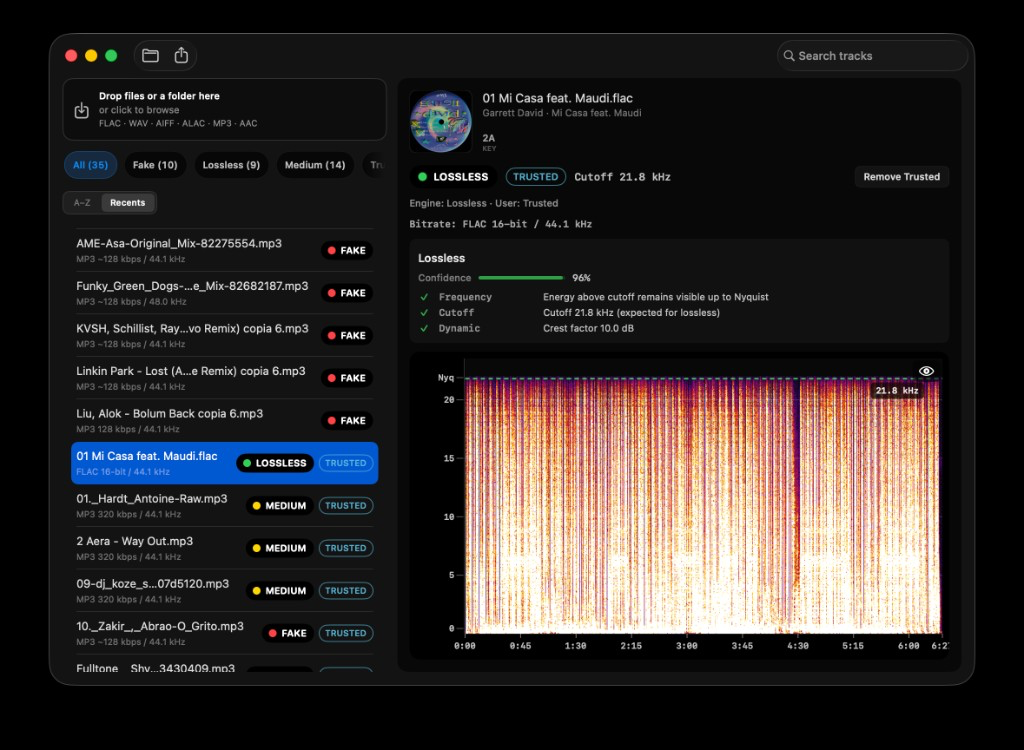
Quick Answer: No. A 100 log, a matching AccurateRip CRC, or a clean
flac -ttest proves the extract and the container. It does not prove the PCM was a lossless master. A CD pressed from an MP3, a WEB FLAC with no cue, and a tracker pack can all hash as “accurate” or decode as valid FLAC and still show a 16–20 kHz brickwall. Verify the file with spectral cutoff, not the log score. Spectro batch-scans the folder on Mac and returns LOSSLESS / FAKE / MEDIUM.
The screenshot is a genuine CD-quality FLAC: 16-bit/44.1 kHz, cutoff 21.8 kHz, energy toward Nyquist. That is what a real lossless master looks like. A 100 log on a different folder does not guarantee this picture.
Two checks answer two questions:
| Check | What it proves | What it does not prove |
|---|---|---|
| AccurateRip / XLD / EAC log | This extract matches other rips of that CD pressing | The glass master was never lossy |
flac -t / MD5 | The FLAC frames are intact | The audio inside was never an MP3 |
| Cue sheet | Track gaps and TOC-ish layout | Spectral bandwidth |
| Spectrogram / Spectro | Cutoff shape on disk | Which plant pressed the CD |
Spectro does not query AccurateRip. It does not score logs. It reads WAV, AIFF, FLAC, ALAC, MP3, and AAC on your Mac, offline.
Does a 100 AccurateRip log mean the FLAC is lossless?
No. AccurateRip compares a checksum of your rip to other people’s rips of the same disc. A match means: same audio bits came off that pressing, with the right drive offset. That is a good CD extract. It is not a certificate that the studio master was lossless.
A pressed CD can still carry a lossy history: a label used an MP3 as the production master, a compilation was assembled from WEB files, or an unofficial disc was burned from a transcode. Every AccurateRip user who ripped that same disc will also get a 100. The log agrees. The brickwall stays.
If you have no cue and no log, AccurateRip may not even run. WEB FLACs from stores and stream-adjacent packs often have trimmed gaps. They will not verify against a CD database. That failure is about layout, not about MP3. Do not treat “AccurateRip not found” as fake lossless. Treat a hard spectral wall as fake lossless. See How to Verify Your FLAC Files Are Actually Lossless.
This article is not an XLD or EAC ripping guide. If you already ripped with those tools, keep the logs. Then scan the FLACs.
Can flac -t or a cue sheet prove quality?
No. flac -t checks that the lossless codec can decode the file. A fake FLAC is still a valid FLAC. The cue sheet stores indexes. Neither looks at 16 kHz.
Hoarders mix three jobs:
- Integrity — is the file corrupt? Checksum /
flac -t. - Extraction accuracy — did the drive read this CD like other drives? AccurateRip / log.
- Source bandwidth — was the audio ever MP3 or AAC? Spectrum.
Spectro is job 3, in batch. Job 1 and 2 stay with the tools you already use.
Why do tracker FLACs and WEB downloads pass a log and still look lossy?
Because many of them were never that CD. A WEB download is a store or label file. It will not match AccurateRip. People still look at a random log from a different rip and assume the folder is clean.
A transcode wrapped as FLAC is the other case: valid container, impressive size, fake lossless. DJ software shows FLAC. AccurateRip is silent or irrelevant. The spectrogram shows the encoder wall. You Converted YouTube to FLAC. It Is Still Lossy is that pipeline for converters. Scene and pool folders use the same physics.
A vinyl needledrop is a third object. It often has no AccurateRip row at all. A soft top end is analog, not MP3. See Vinyl Rip Roll-Off Is Not a Transcode.
How do you check a ripped FLAC folder on a Mac?
Do not open Spek on 2,000 files. Do not upload the archive to a web checker.
- Keep the log and cue next to the album if you have them. They are provenance, not a Spectro input.
- Drag the parent folder into Spectro.
- Sort FAKE, then MEDIUM. FAKE is a brickwall. MEDIUM is the 19–20 kHz gray zone, old tape, or a high-bitrate source.
- Open the spectrogram on MEDIUM. Hard wall vs gradual slope. False positives covers 32 kHz files and vinyl.
- Optional Finder tags quarantine FAKE before the files hit Roon, Music.app, or Rekordbox.
Spectro returns one LOSSLESS / FAKE / MEDIUM verdict per file (Verdict Engine v1.5). Fully offline. 100-track free trial. It will not replace XLD. It will tell you whether the PCM looks like a master or like an MP3.
If iTunes Match or iCloud Music Library rewrote a rip to 256 kbps AAC, the log on the old folder is history. The file on disk is the one that matters. See Is Apple Music Lossless Actually Lossless?.
FAQ
Does a 100 log prove a FLAC is lossless?
No. It proves a matching CD extract. Scan the spectrum for a brickwall. That is the lossless test.
Does AccurateRip detect fake FLAC?
No. AccurateRip is a CD-rip database. Fake FLAC is a spectral problem. Use both if you have a disc. Use only the spectrum if you have a WEB folder.
My AccurateRip said not found. Is the album fake?
Not necessarily. Many WEB and store FLACs have no CD TOC to match. Look at cutoff shape, not the AR miss.
Can Spectro read XLD or EAC logs?
No. Drag the audio files. Keep the logs for your own archive.
How do I scan hundreds of CD rips on a Mac?
Drag the rips folder into Spectro. Filter FAKE and MEDIUM. Analysis stays on-device. 100 tracks free, then a one-time license.
Logs prove the rip. Spectro proves the master. Drag the FLAC folder in. Fake FLAC detector. 100-track free trial. Mixed WAV/AIFF folders can use the lossless audio checker.
Related posts
Try Spectro free
100 tracks free. No account needed. Personal $24.99 for 1 Mac; Duo $39 for up to 2 Macs.
Download the free 100-track trial