 Spectro
Spectro Team · September 18, 2026 · 8 min read
Is Apple Music Lossless Actually Lossless?
Apple Music Lossless uses ALAC up to 24-bit/192 kHz. The badge does not prove your library. Verify local files on Mac. Try 100 tracks.
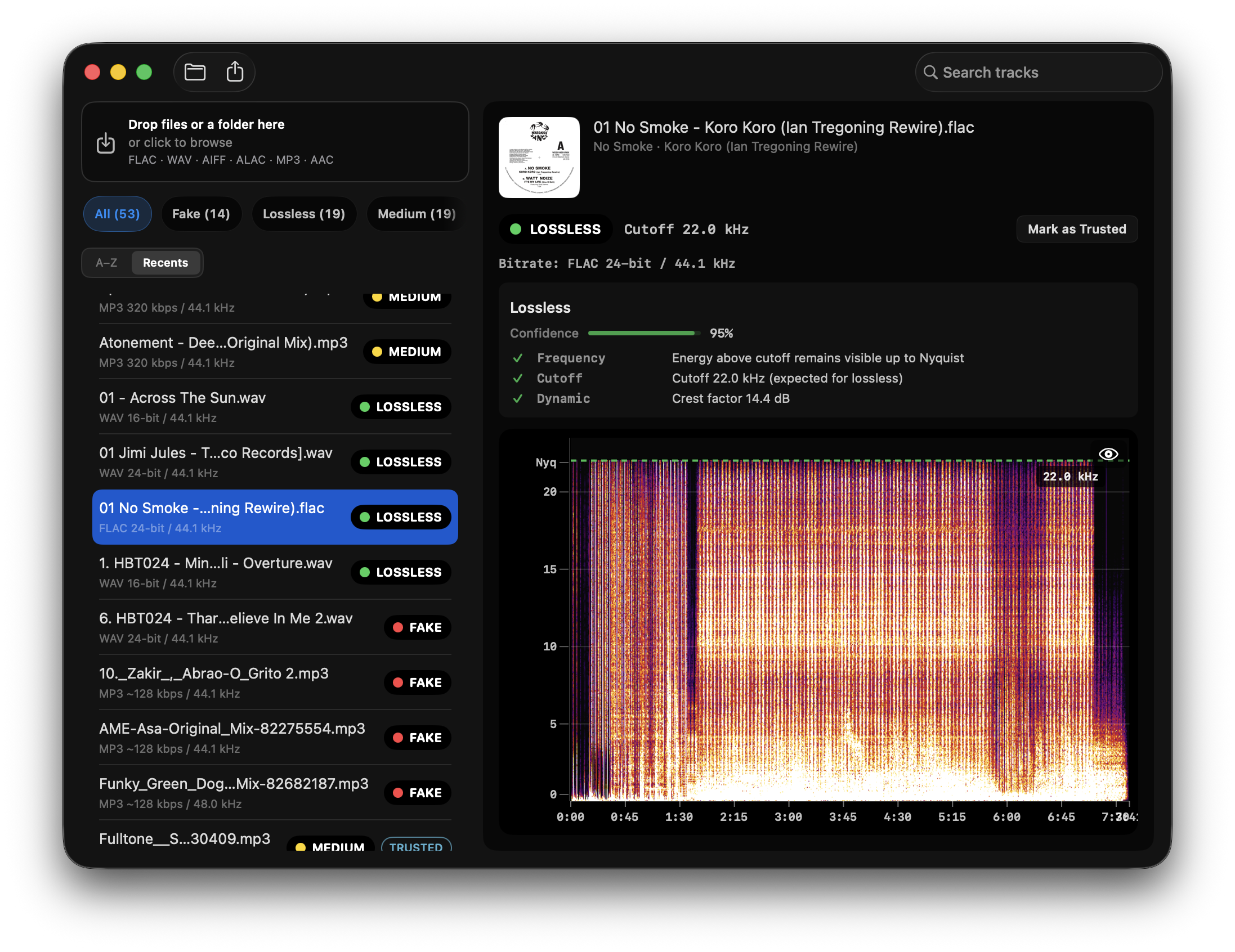
Quick Answer: Two different questions. 1) Stream: Apple Music Lossless is real ALAC, from CD quality (16-bit/44.1 kHz) up to Hi-Res Lossless (24-bit/192 kHz) when the catalog includes it. 2) File: the Lossless badge is not a certificate for the tracks on your disk. Spectro cannot inspect a DRM stream. It can batch-scan local ALAC, FLAC, WAV, and AIFF files and return LOSSLESS, FAKE, or MEDIUM. Do not trust the badge alone.
This screenshot is a local file, not an Apple Music download. Spectro cannot inspect DRM streams. A genuine ALAC on disk looks like this FLAC: energy toward Nyquist, no brickwall. The codec box (ALAC vs FLAC) does not change the spectrum.
Apple Music put lossless audio on the standard plan. That is a real codec change, not a slogan. ALAC (Apple Lossless Audio Codec) preserves PCM the same way FLAC does: compression without throwing away samples. The harder question for Mac users who also keep a DJ crate, a Roon library, or a Music.app archive is whether the files they own match that promise.
This article separates the Apple Music stream from the files on disk, explains why a 24-bit ALAC can still be an upsampled CD, and shows how to verify a local folder without opening hundreds of spectrograms.
Is Apple Music Lossless actually lossless?
Yes at the codec level. Apple encodes the catalog in ALAC. Apple’s own lossless guide states that Lossless means ALAC up to 24-bit/48 kHz, and Hi-Res Lossless means ALAC from 48 kHz up to 24-bit/192 kHz. That is lossless compression of whatever PCM Apple has on file.
It is not a guarantee that every master was captured or mixed at that resolution. If a label delivered a CD-quality or previously lossy master, ALAC only preserves that master. The same split applies to Tidal FLAC and to hi-res downloads from Qobuz, HDtracks, and Bandcamp: container and sample rate describe the box, not the source.
Apple Music Lossless is also not Bluetooth lossless. AirPods and other Bluetooth headphones use a lossy link. Hi-Res Lossless above 48 kHz on iPhone needs a wired external DAC. Those playback limits do not change the file on Apple’s servers. They do change what you hear.
Does the Lossless badge prove my Music library is genuine?
No. The badge answers “does this title have an ALAC encode in Apple Music?” It does not answer “is the ALAC, WAV, or FLAC sitting in this folder a genuine lossless master?”
Mac libraries mix sources. A typical Music.app or DJ folder contains CD rips, Bandcamp ALACs, Beatport WAVs, old iTunes purchases, and files that passed through iCloud Music Library or iTunes Match. Match historically served 256 kbps AAC for catalog matches. A file that still says .m4a can be ALAC or AAC. The extension does not tell you.
Spectro reads ALAC in .m4a containers the same way it reads FLAC and WAV: spectral cutoff, not the label. A genuine 44.1 kHz lossless file usually shows energy approaching ~22 kHz. A transcode from MP3 or AAC shows a hard wall, often between 16 kHz and 20 kHz. A 24-bit/96 kHz ALAC that still dies at 22 kHz is hi-res in name only. See How to Detect Fake Hi-Res Audio for the upsample pattern.
Can Spectro check Apple Music streams?
No, and it should not. Offline Apple Music downloads are DRM-protected. Spectro is an offline file checker for WAV, AIFF, FLAC, ALAC, MP3, and AAC on disk. It does not decrypt streams, does not attach to the Music app as a player plugin, and does not claim to grade what is currently playing.
The useful workflow is the library you actually control:
- Keep Apple Music for reference listening if you want the lossless stream.
- Treat rips, store downloads, and DJ purchases as a separate pile.
- Drag that pile into a fake FLAC detector or a lossless audio checker.
- Filter FAKE and MEDIUM. Replace or quarantine those files before they enter Rekordbox, Serato, or a hi-fi folder.
That is the same split as Spotify lossless: the service can be lossless and your local copies can still be fake.
How do I verify ALAC files in my Music library on Mac?
Checking one track in Spek works for a single suspicion. It does not scale to thousands of ALACs.
Spectro is a native macOS app for this job:
- Copy or locate the folder of ALAC, FLAC, WAV, or AIFF files you own. Not the Apple Music cache.
- Drag the folder into Spectro (or point a watch folder at downloads).
- Each file gets a LOSSLESS, FAKE, or MEDIUM verdict with cutoff and a one-line diagnosis.
- Optional Finder color tags mark problem files before you import them into DJ software.
Verdict Engine v1.5 adds 44.1→48 kHz upsample detection, crest factor, clipping, and stereo correlation. Analysis stays offline. The 100-track free trial needs no account. For the method, see How Fake Lossless Detection Works and How to Verify Your FLAC Files Are Actually Lossless.
Can a 24-bit Apple Music file still be an upsampled CD?
Yes, if you are talking about a local hi-res file, not the stream badge. Sample rate and bit depth are container fields. A 24-bit/96 kHz ALAC or FLAC whose spectrum still ends at ~22 kHz is CD audio in a larger box. Labels reissue catalog this way. Stores sometimes receive that master unchanged.
Apple’s Hi-Res Lossless tier can be genuine when the delivered master actually contains energy above 22 kHz. It can also be a 24/48 or 24/96 wrap of a 44.1 kHz source. You only know after you have a file you are allowed to analyze. Do not rip or strip DRM to “test Apple Music.” Buy or rip a copy you own, then scan it.
If you converted a YouTube rip or an MP3 into ALAC because Apple Music made lossless feel mandatory, that file is still lossy. See You Converted YouTube to FLAC. It Is Still Lossy.
Did iTunes Match replace my CD rip with AAC?
It can. iTunes Match and iCloud Music Library fingerprint a track and, when they find a catalog match, may serve Apple’s 256 kbps AAC instead of your ALAC or AIFF rip. The row in Music.app still looks like your song. The file on disk is not the rip. The extension can stay .m4a.
What to do:
- Do not use Match as a backup of CD rips. Keep the rip folder outside iCloud’s reach.
- If a file that used to be a CD rip now shows a ~16–20 kHz wall in Spectro, restore from a backup that never went through Match.
- A 100 AccurateRip log on the old folder does not rescue the new AAC. The log proved the extract you had. Scan the file that is actually there. See A 100 Log Does Not Prove Your FLAC Is Lossless.
Spectro does not read iCloud. It reads local ALAC, AAC, FLAC, WAV, AIFF, and MP3.
FAQ
Is Apple Music Lossless the same as a real FLAC download?
No. Apple Music Lossless is an ALAC stream (and a DRM download inside the Music app). A FLAC from Qobuz, Bandcamp, or a CD rip is a file you control. Both can be genuinely lossless. Only the file can go through a lossless audio checker.
Does Bluetooth play Apple Music Lossless?
No. Bluetooth codecs are lossy. Lossless and Hi-Res Lossless need a wired path. On iPhone, sample rates above 48 kHz also need an external DAC. That is a playback limit, not proof about your archive.
Can iCloud Music Library replace lossless rips with AAC?
Yes, that is a known Mac-library failure mode. Matching can serve a 256 kbps AAC instead of your original ALAC rip. If a file that used to be a CD rip now shows a ~16–20 kHz wall, scan the folder and restore from a backup that never went through Match.
How can I tell if an ALAC file is fake lossless?
Same test as FLAC. At 44.1 kHz, genuine lossless energy usually approaches ~22 kHz. Fake lossless shows a hard cutoff from the original MP3 or AAC encoder. Spectro returns FAKE, MEDIUM, or LOSSLESS in batch on macOS.
Does Spectro work on Apple Silicon?
Yes. Spectro is a Universal Binary for Apple Silicon and Intel. macOS 13 or later. ALAC in .m4a is a supported format.
The fastest way to verify local ALACs and FLACs on Mac is Spectro: drag the folder in, get a verdict per track. Lossless audio checker. 100-track free trial. FLAC-heavy folders can use the fake FLAC detector.
Related posts
Try Spectro free
100 tracks free. No account needed. Personal $24.99 for 1 Mac; Duo $39 for up to 2 Macs.
Download the free 100-track trial