 Spectro
Spectro Team · September 18, 2026 · 7 min read
You Converted YouTube to FLAC. It Is Still Lossy
Converting YouTube or MP3 to FLAC does not restore lost highs. The file is still lossy. Batch-check the folder on Mac. 100-track trial.
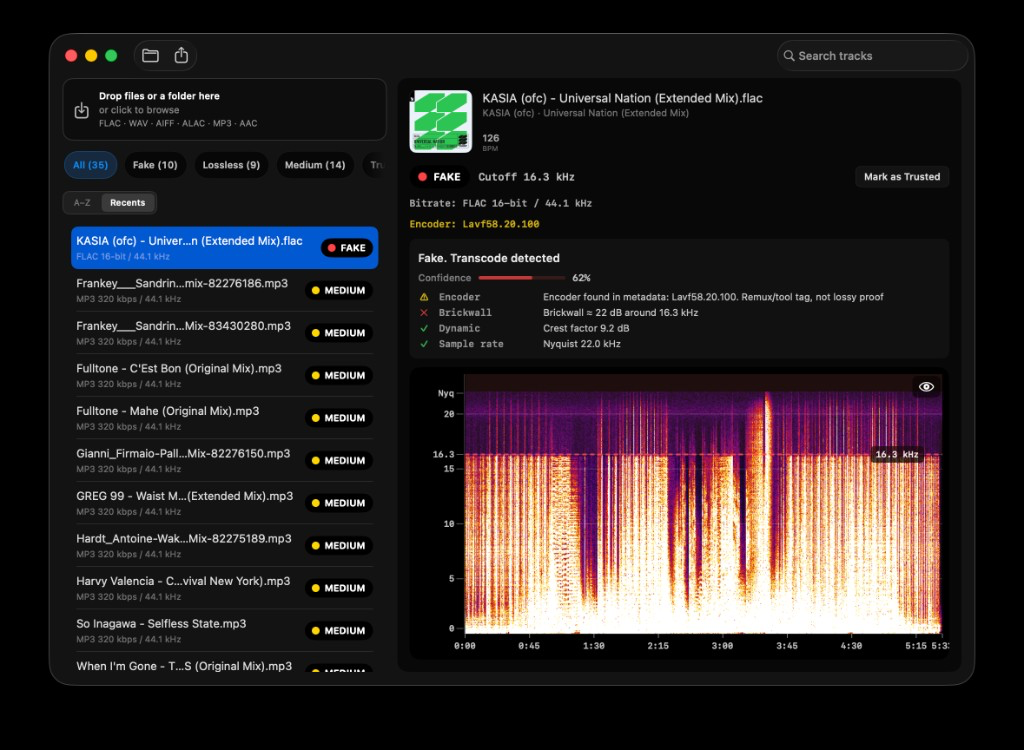
Quick Answer: No. Converting YouTube audio or an MP3 to FLAC, WAV, or ALAC does not restore frequencies the lossy encoder already deleted. You get a larger file with the same brickwall cutoff, typically 16–20 kHz. That is fake lossless. Batch-scan the folder on Mac and read LOSSLESS / FAKE / MEDIUM first. Spectro flags the cutoff automatically. Do not convert to “upgrade” a crate.
Search for “youtube to flac” or “convert mp3 to flac” and you will find converters that promise a lossless library in one click. The output is a valid FLAC. The audio inside is still the YouTube AAC or the original MP3. File size goes up. High-frequency content does not come back. The screenshot above is that case: a .flac labeled 16-bit/44.1 kHz, FAKE at 16.3 kHz. The encoder tag only proves a remux tool touched the file. It does not restore the missing highs.
This is one of the main ways fake lossless enters DJ USBs and hoarder folders in 2026. The rest of this article explains why the conversion cannot work, what the spectrum looks like, and how to audit a folder of converted files without a ffmpeg tutorial.
Does converting YouTube to FLAC make it lossless?
No. YouTube delivers lossy audio (AAC or Opus, depending on the stream). A converter decodes that lossy stream to PCM and wraps the PCM in FLAC. FLAC then compresses the PCM without further loss. It is lossless relative to the already-damaged PCM, not relative to a studio master.
Once a lossy encoder has discarded high-frequency bands and masked transients, those samples are gone. Re-wrapping cannot invent cymbal air or stereo detail that was never in the download. The FLAC is honest about the container and dishonest about the history.
The same rule applies to “youtube to wav” for DJs. WAV is uncompressed PCM of the same lossy decode. Rekordbox and Serato will show WAV. The club system still plays a YouTube-shaped spectrum. For the WAV-specific case, see MP3 Disguised as WAV.
What happens when you convert MP3 to FLAC?
The file gets bigger. The cutoff stays. MP3 at 128 kbps usually walls around 16 kHz. 192 kbps around 19 kHz. 320 kbps around 19–20 kHz. After FLAC encode, those walls are still there. Spectro often marks the 320 kbps case as MEDIUM rather than guessing FAKE, because high-bitrate MP3 can sit close to some genuine masters. A 128 kbps YouTube or MP3 source is a clear FAKE.
People convert MP3 to FLAC for three reasons: a tool defaulted to FLAC, a Telegram pack was labeled “lossless,” or they wanted one format in the crate. None of those recover data. If you need a smaller lossless archive of a genuine master, FLAC from a CD rip or a store WAV is the right move. If the source is already MP3, keep it as an honest MP3 or replace it. See Is FLAC Better Than MP3? for genuine FLAC vs honest 320 vs fake FLAC. See Why Your 320kbps MP3 Sounds Like 128kbps when the tag and the spectrum disagree.
Why does the converted file look lossless in DJ software?
DJ software reads the container and the header. FLAC, WAV, and AIFF are lossless formats, so the row says lossless. Metadata editors, Finder, and USB export tools do the same. None of them run a spectral cutoff check.
That is why converted folders survive for years. The lie is in the extension, not in a corrupt file. What Is Fake Lossless Audio? covers how this happens in pools and re-encodes. YouTube converters are just the consumer version of the same pipeline.
A converted FLAC can also pick up extra harm: clipping from a loud YouTube master, joint-stereo smear, and pre-echo on transients. Those do not always change the verdict, but they are why a “lossless” YouTube rip still sounds small on a PA. A YouTube video labeled “vinyl rip” is still a lossy stream. The analog slope of a real needledrop is a different object: Vinyl Rip Roll-Off Is Not a Transcode.
How do you check a folder of converted FLACs on Mac?
Do not open Spek on 400 files. Batch first.
- Put the converted folder on the Mac. Do not upload it to a web checker if the tracks are unreleased or promo.
- Drag the folder into Spectro, a native macOS fake lossless checker.
- Sort by FAKE, then MEDIUM. FAKE is the YouTube/MP3 wall. MEDIUM is the high-bitrate gray zone.
- Replace FAKE tracks with a store download or a CD rip. Keep honest MP3s as MP3 if you cannot replace them.
- Optional Finder tags keep the quarantine visible before Rekordbox or Serato import.
Spectro returns one LOSSLESS / FAKE / MEDIUM verdict per file from spectral cutoff analysis (Verdict Engine v1.5). It supports FLAC, WAV, AIFF, ALAC, MP3, and AAC, fully offline, with a 100-track free trial. For the science, see How Fake Lossless Detection Works. For the full how-to, see How to Detect Fake Lossless Audio Files on Mac.
If you converted files because Apple Music Lossless made you chase a lossless badge, the stream and the YouTube rip are different objects. Read Is Apple Music Lossless Actually Lossless? before you “upgrade” a crate with converters.
What should you do instead of converting to FLAC?
Buy or rip a real lossless source. Beatport, Bandcamp, Qobuz, a CD, or a label WAV. Then verify. Do not run a converter “to be safe.”
If the only copy is YouTube or MP3, leave it lossy on purpose. An honest 320 kbps MP3 is easier to reason about than a fake FLAC that fools the USB export list.
If you already converted a library, scan it once, tag the fakes, and stop converting new rips. A watch folder on Mac will catch the next pack before it hits the crate.
This article is not a conversion recipe. Tools that turn YouTube into FLAC are how fake lossless gets manufactured. Spectro exists to find the result, not to help create it.
FAQ
Does converting YouTube to FLAC make it lossless?
No. YouTube audio is already lossy. FLAC only preserves the decoded PCM. The brickwall cutoff stays. The larger file is fake lossless.
Does converting MP3 to FLAC improve quality?
No. MP3 encoding already deleted high-frequency content. FLAC cannot put it back. You only change packaging and disk use.
Why is my YouTube FLAC bigger but still dull?
Because FLAC stored silence (or encoder noise) above the original cutoff more expensively. Size tracks the container, not restored air. Check cutoff with a fake FLAC detector.
Can Rekordbox tell that a FLAC came from YouTube?
No. Rekordbox trusts the format field. Spectral analysis is a separate step, on disk, before USB export. See the Rekordbox audio checker.
How do I scan hundreds of converted files on a Mac?
Drag the folder into Spectro. Filter FAKE and MEDIUM. Analysis stays on-device. 100 tracks free, then a one-time license.
Converted FLACs are the problem Spectro was built to catch. Drag the folder in, get a verdict per track. Fake FLAC detector. 100-track free trial. Mixed WAV/AIFF folders can use the lossless audio checker.
Related posts
Try Spectro free
100 tracks free. No account needed. Personal $24.99 for 1 Mac; Duo $39 for up to 2 Macs.
Download the free 100-track trial